Published by December 3, 2025 · Reading time 23 minutes · Created by Lix.so
Think about it like this: would you rather build a thousand custom cars by hand, one by one, or set up an automated assembly line? That’s the real difference between manually clicking around in Ads Manager and tapping into the Facebook Ads API. It’s your direct, programmatic connection to Facebook’s ad platform, built for one thing: massive scale.
For most of us, the Facebook Ads Manager is home base. It's visual, pretty intuitive, and works perfectly well when you're juggling a handful of campaigns. But the moment your ambitions grow—when you need to test hundreds of creative variations, manage a dozen different ad accounts, or roll out campaigns across multiple countries—that friendly, click-by-click interface becomes a serious bottleneck.
This is where the Facebook Ads API stops being a "developer tool" and becomes a core strategic asset. It flips the script, turning advertising from a manual chore into a series of automated workflows. Instead of painstakingly building campaigns one by one, you can launch them in batches of hundreds, freeing up your team to think about strategy, not tedious execution.

Imagine the API gives you a key to the engine room of Facebook's entire advertising system. With that access, you can do things that are flat-out impossible through the standard Ads Manager interface.
The real magic of the Facebook Ads API is its power to turn a strategic idea into a fully executed campaign almost instantly. It removes the human "click speed" as a constraint on growth.
The opportunity here is just staggering, especially when you consider the platform's sheer size. As of early 2025, you can reach about 2.28 billion people worldwide through Facebook Ads. That audience grew by 93.3 million users in just the last year alone, a clear sign of the massive, ever-expanding field available to advertisers who can operate at scale. You can dive deeper into these numbers over at DataReportal's global overview. This guide is all about showing you how to harness that scale without drowning in manual work.

Before you can start automating anything, you need the right keys to the kingdom. Getting started with the Facebook Ads API means going through a crucial security step called authentication.
Think of it like giving a digital valet key to an application. This process, known as OAuth 2.0, lets you grant specific, limited permissions without ever handing over your master password (your main Facebook login). It's a secure handshake that allows an app to create ads or pull campaign data on your behalf, forming the bedrock for all your automation work.
Getting your first access token is a straightforward but essential multi-step dance. Each step builds on the last, ensuring you have a secure and correctly configured app that’s ready to start making API calls. Nail these steps, and you'll sidestep the common setup headaches that trip up many developers.
Create a Meta for Developers Account: This is your starting line. If you don’t have one, you’ll need to register on the Meta for Developers platform. It’s the central hub where all your applications will live.
Set Up Your First App: Inside your new developer account, you’ll create an app. You'll be asked to choose an app type—for our purposes, "Business" is almost always the right call, as it’s designed to manage assets like ad accounts and Pages.
Request Essential Permissions: Your app is born with zero power. You have to explicitly ask for the permissions (called "scopes") it needs. The most critical one for managing campaigns is ads_management. You might also need ads_read for reporting or business_management for more administrative tasks.
Generate Your First Access Token: Once your app is configured with the right permissions, you can generate an access token. This token is that "valet key" we talked about—a long, unique string of characters you'll include in every API request to prove your app has the authority to act.
An access token is your application's passport. It verifies your app's identity and confirms the specific permissions it has been granted, allowing it to securely communicate with the Facebook Ads API endpoints.
If you want to see how this authentication piece fits into the bigger puzzle, our detailed guide on the fb ads api gives you the full context on how these tokens and permissions unlock advanced campaign management.
Here’s something that catches a lot of people off guard: not all access tokens are created equal.
When you first generate one, it’s usually a short-term token that expires in about an hour. That’s fine for a quick test, but it's completely useless for any real, long-running automation.
To build anything reliable, you must exchange that short-term token for a long-term token. A long-term token lasts for about 60 days, making it perfect for automated systems that need to run without you constantly babysitting them. The exchange is just a simple API call where you trade in your short-lived token for a fresh, long-lasting one.
Properly managing these token lifecycles is fundamental. Your application needs to be smart enough to handle token refreshes gracefully, ensuring your workflows keep humming along without any sudden authentication failures.
To get the most out of the API Facebook ads platform, you have to speak its language. The Ads Manager uses a visual interface, but the API communicates through a clean, hierarchical structure. Learning this structure is like learning the grammar of a new language—once you get it, you can build powerful and complex commands without a second thought.
Let's think of your entire advertising account as a big digital filing cabinet. We'll use this simple analogy to break down the three fundamental pieces that every single Facebook ad is built on.
At the very top, you have the Campaign. In our analogy, the Campaign is the entire filing cabinet itself. It's the highest-level container, and its only job is to define a single, clear advertising objective.
You set one goal here, and everything inside this "filing cabinet" will be geared toward hitting that target. You’re telling Facebook, "Everything I'm about to build is for getting more website traffic," or "...for generating leads," or "...for driving sales." It's your mission statement.
Some of the most common campaign objectives you'll set through the API are:
LINK_CLICKS: To drive traffic to a specific webpage.CONVERSIONS: To get people to take valuable actions like purchasing or signing up.LEAD_GENERATION: To collect info from people who are interested in your business.REACH: To show your ads to the maximum number of people possible.The campaign level is intentionally simple. You define the objective and give it a name, and that’s pretty much it. All the nitty-gritty decisions about who sees your ads and how much you spend come next.
If the Campaign is the filing cabinet, then each Ad Set is a drawer inside it. You can have multiple drawers in your cabinet, and each one holds a specific category of files. In the world of the API, each Ad Set defines a unique audience, budget, schedule, and placement strategy.
This is where all the targeting magic happens. For every Ad Set, you spell out exactly who you want to reach. This layer is absolutely critical for testing, as you can create different Ad Sets (drawers) to target different demographics, interests, or behaviors—all while chasing the same campaign objective.
Key parameters you'll be managing at the Ad Set level include:
targeting: A detailed object where you specify age, gender, location, interests, and custom audiences.daily_budget or lifetime_budget: This is where you control your spend, setting limits for how much is spent per day or over the ad set's entire run.start_time and end_time: You dictate the precise schedule for when your ads will run.billing_event: This defines what you actually pay for, like impressions (IMPRESSIONS) or link clicks (LINK_CLICKS).Think of an Ad Set as your strategic playbook for a specific audience. Creating several of them is how you methodically test which groups respond best to your ads.
Finally, inside each drawer (Ad Set), you have the individual files—your Ads. An Ad is the actual creative content that people see scrolling through their feeds. It’s the final product: an image or video combined with a headline, some text, and a call-to-action button.
Each Ad is attached to a specific Ad Set, which means it automatically inherits the targeting, budget, and schedule defined in its parent "drawer." This setup lets you test multiple creative variations against the same audience. For example, you could run a video ad and a carousel ad within the same Ad Set to see which one performs better.
The Campaign sets the 'why' (your objective). The Ad Set defines the 'who' and 'how' (your audience and budget). The Ad is the 'what' (the creative they actually see). Internalizing this flow is the key to building any automation with the API.
This hierarchy is the engine behind a truly massive platform. For context, Facebook's ad revenue hit about $131.9 billion globally in 2023, powered by nearly 10 million active advertisers. These advertisers see an average conversion rate of 9.2%, which shows just how effective this tiered system is at guiding users toward a goal. You can dig into more incredible Facebook ads statistics to see the full scope.
Before we move on, let's summarize these core components in a quick table.
This table breaks down the main API objects and their specific roles in an advertising campaign, making the hierarchy easy to visualize.
| API Object | Purpose | Example Parameters Controlled |
|---|---|---|
| Campaign | Sets the single, high-level advertising goal. | objective (e.g., CONVERSIONS), name, status |
| Ad Set | Defines audience, budget, schedule, placements. | targeting, daily_budget, start_time, optimization_goal |
| Ad | The actual creative content users see. | creative (image/video ID), name, adset_id, status |
Seeing it laid out like this really clarifies how everything fits together.
By getting this Campaign -> Ad Set -> Ad structure down, you can start to think programmatically. Instead of clicking through menus, you can visualize building campaigns as nesting these objects together—which is exactly what you’ll do when you start making API calls.
This is where you unlock the real power of the Facebook Ads API. Creating one ad manually in Ads Manager is easy enough. But trying to scale that up to test dozens of different images, headlines, and audiences? That quickly turns into a nightmare of repetitive clicks and inevitable mistakes.
Batch requests are the answer. They let you programmatically create hundreds—or even thousands—of ad variations in a single, powerful API call.
Think of it like this: instead of calling a restaurant to order every single dish one by one for a huge party, you hand them a detailed catering list for the entire event. It's wildly more efficient, far less likely to have errors, and it's the only way to operate when you're dealing with serious volume.
With batching, you can build out an entire campaign structure—the campaign itself, all its ad sets, and every single ad—in one go. This is the secret sauce behind high-velocity creative testing, rapid localization, and massive product catalog launches.
The entire system is built on Facebook's ad hierarchy, which you'll replicate in your batch requests.
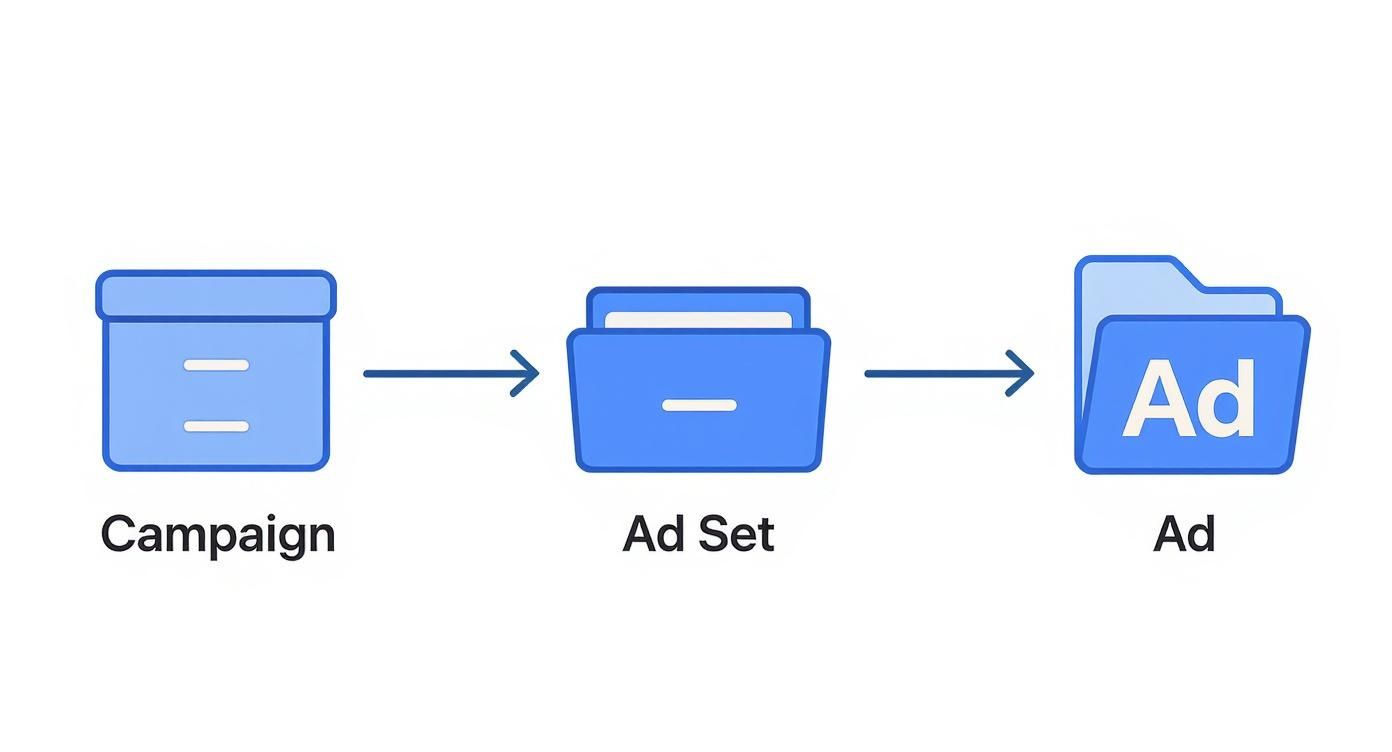
As the diagram shows, a Campaign holds Ad Sets, and each Ad Set holds individual Ads. Your batch request simply defines all these interconnected pieces at once.
What makes batch requests so potent is the ability to define dependencies within the same call. You don’t have to create one object, wait for the API to respond with an ID, and then use that ID to create the next object. That old, sequential process is painfully slow.
Instead, you can create a placeholder reference that tells the API how all the pieces of your request are connected.
For example, you can effectively say: "Create an Ad Set with this targeting, and then immediately create an Ad that belongs to that exact Ad Set I just told you to make." You accomplish this by naming your individual API calls within the batch request and then using those names as references. It’s a game-changer.
A batch request isn't just a simple list of commands; it's a complete blueprint for an entire campaign structure. By referencing dependencies, you’re giving Facebook's servers the full plan, allowing them to execute everything in one seamless operation.
Let's walk through a common scenario for performance marketers: launching a fresh batch of image ads into a campaign and ad set that are already running.
The entire workflow can be bundled into a single batch request with three main steps:
adimages object for each new visual. For each successful upload, the API gives you back an image hash.adcreatives. This is where you combine the image hash from step one with your ad copy—the headlines, body text, and calls to action.ads themselves. In this last part, you reference the creative_id from step two and tell the API which adset_id these new ads should run in.This entire sequence is defined in one JSON payload and sent to the API. The server processes each part, understands the connections you defined, and builds everything out for you. To see this in more detail, including creating the campaigns and ad sets from scratch, check out our complete guide to batch-creating Facebook campaigns.
While a full JSON payload for a large batch can be lengthy, the structure is quite logical. Each operation in the batch array is an object specifying the method (like POST), the relative_url for the endpoint, and the body of the request.
Here’s a simplified snippet to show you how the dependency linking works:
[
{
"method": "POST",
"relative_url": "act_AD_ACCOUNT_ID/adcreatives",
"name": "creative-creation-call",
"body": "name=New Product Creative&image_hash=..."
},
{
"method": "POST",
"relative_url": "act_AD_ACCOUNT_ID/ads",
"body": "name=New Ad&adset_id=EXISTING_ADSET_ID&creative={result=creative-creation-call:$.id}"
}
]
See the {result=creative-creation-call:$.id} part? That's the magic. It instructs the second call to wait for the first one (which we named creative-creation-call) to finish, grab the id from its result, and plug it in as the creative for the new ad.
Mastering this workflow is a cornerstone skill for any serious advertiser. It lets you automate creative testing and campaign rollouts at a level that is simply impossible to achieve through any manual interface.
When you start building powerful automation with the Facebook Ads API, you have to plan for things to go wrong. It's not a matter of if, but when.
Think of the API as a busy highway. To keep traffic flowing smoothly for everyone, Facebook puts up rate limits—basically, speed limits that control how many requests you can send in a certain amount of time. If you ignore them, your app gets temporarily pulled over, leading to failed requests and broken workflows.
Real automation isn't just about sending successful requests; it's about building a system that can anticipate and gracefully handle these inevitable bumps in the road.
Luckily, Facebook gives you the data you need to stay under the speed limit right in the response headers of every API call. By keeping an eye on these headers, you can see your current usage in real time and know when it's time to slow down before you hit a wall.
The best strategy isn't reacting to rate limit errors—it's avoiding them in the first place. A little smart planning goes a long way in reducing the number of calls you need to make, keeping your application running smoothly and reliably.
Here are the two most critical strategies you should be using:
Think of exponential backoff like being a polite driver in a traffic jam. Instead of repeatedly bumping the car in front of you, you wait patiently and give the system space to clear up. It ensures a smoother journey for everyone involved.
Even with perfect planning, errors are a fact of life. The key to debugging quickly and getting your automation back on track is understanding what these errors actually mean. The API will always return specific error codes that tell you exactly what went wrong.
Here’s a breakdown of some of the most common errors you'll run into:
| Error Code | What It Means | How to Fix It |
|---|---|---|
| 100 | Invalid Parameter | Your request is missing a required field or has a typo. Double-check your JSON payload against the API docs. |
| 200 | Permissions Error | Your access token doesn't have the right permissions (like ads_management). Check that your app has the correct scopes. |
| 80004 | Throttled / Rate Limit Exceeded | You've made too many calls. It's time to implement exponential backoff and lean more heavily on batch requests. |
| 190 | Invalid OAuth 2.0 Access Token | Your token is either expired or invalid. You’ll need to refresh it or have the user re-authenticate. |
| 2446079 | Ad Set Targeting Spec Is Invalid | Something is wrong with your targeting parameters. This often happens with incorrect location or interest IDs. |
Building resilient workflows that can handle these situations is what separates a fragile script from enterprise-grade automation. It's what allows for more advanced strategies, too. For instance, solid error handling is crucial for running dynamic creative ads, which are known to boost conversion rates by around 30%. Similarly, ads that use A/B testing can see a fourfold return on investment, but that process relies on stable and predictable API interactions. You can find more data on effective Facebook ad strategies to see just how much iterative optimization can pay off.
While the raw Facebook Ads API is undeniably powerful, working with it directly is a serious commitment. It demands significant developer time and resources to build and, more importantly, maintain custom integrations.
Let's be honest, building from scratch is often a complex, time-sucking detour that pulls your team away from what really matters: shipping high-performing ad campaigns. This is exactly where specialized tools come into play, acting as a massive force multiplier for your marketing efforts.
These platforms are built to solve the most common—and frustrating—pain points that advertisers hit every single day. Just imagine trying to manually map dozens of spreadsheet columns to specific fields in an ad creative template. It’s tedious, boring, and a recipe for mistakes. Or picture an agency juggling authentication tokens for 50 different client accounts, each with its own expiration date. It's a logistical nightmare waiting to happen.
The beauty of these tools is that they abstract all that low-level complexity away, giving you a clean, user-friendly interface that sits right on top of the powerful API infrastructure. Instead of writing code to handle batch requests, you can simply upload a CSV file with your creative assets and campaign parameters, and the tool handles the rest.
These solutions bridge the gap between powerful API functionality and practical, day-to-day advertising operations. They let you focus on high-level strategy and creative testing instead of getting bogged down in low-level code and endpoint documentation.
A great example is a platform like Lix.so. It lets you perform advanced tasks like bulk creative generation and entire campaign launches through a simple, visual workflow. If you're curious about how different platforms stack up, we've covered the major players in our overview of Facebook ads automation tools.
This screenshot from Lix.so shows a clear interface for building campaigns from templates. Doing this with the raw API would mean writing some pretty complex batch requests.
The real game-changer here is the transformation of a developer-centric task into an accessible marketing workflow. Suddenly, your team can scale operations without needing a dedicated engineer for every single campaign launch. By bringing a tool like this into your stack, you shift your team's energy from tedious technical implementation to strategic execution, which dramatically accelerates your ability to test, learn, and grow.
Jumping into the Facebook Ads API for the first time can feel a little intimidating, and that's completely normal. Most of the early roadblocks come from a handful of common questions that we hear all the time from advertisers and agencies.
Let's clear the air and tackle the most frequent ones head-on, from who can actually use the API to the classic "build vs. buy" debate.
There’s a common myth that the API is an exclusive club, reserved only for giant advertisers with massive budgets. The reality is, it’s much more accessible than you might think.
Any business with a Meta Business Account and a registered developer app can get in the game. You don't need a minimum ad spend to start. The main hurdles are having the technical chops to make API calls and, of course, playing by Meta's platform rules. If you plan to manage ad accounts for clients, you'll also need to go through an App Review process.
Ah, the age-old "build vs. buy" dilemma. This is a crossroads nearly every growing team hits. The right answer really boils down to your team's resources, your specific goals, and how much of a headache you're willing to take on.
Building your own custom solution makes sense if:
Hopping on board with a specialized tool is the smarter move when:
It really comes down to one simple question: Is your core business advertising, or is it software development? For most advertisers and agencies, using a ready-made tool lets them stay focused on what they're best at—crafting and running brilliant campaigns.
It’s easy to get these two mixed up, but they do completely different jobs. They’re teammates, not competitors.
The Facebook Ads API (which you'll also hear called the Marketing API) is all about managing your campaigns. Think of it as your remote control for Ads Manager. You use it to create campaigns, set up ad sets, upload your creatives, and pull performance reports.
The Facebook Conversions API (or CAPI) is purely for measurement. It's a direct pipeline that lets you send conversion events—like a purchase or a lead form submission—from your server straight to Facebook. This creates a much more stable and reliable data connection that isn’t derailed by things like cookie blockers or iOS tracking changes.
Here’s the simplest way to think about it: The Ads API helps you launch the planes, and the Conversions API helps you track where they land.
Ready to skip the API headaches and start launching campaigns in seconds? Lix.so was built to replace tedious manual uploads with powerful batch creative tools and smart, reusable templates. See how much time you can get back in your day.
Create hundreds of Facebook Ads campaigns in minutes with Lix.so. Batch creative upload, reusable templates, and automatic campaign generation.
✓ Free for 14 days · ✓ No credit card required · ✓ Cancel anytime

