Published by December 5, 2025 · Reading time 20 minutes · Created by Lix.so
Think of your ad budget as fuel. Without a map, you could drive for miles and end up nowhere, completely wasting that fuel. In the world of digital advertising, audience insights on Facebook are your GPS, guiding you straight to the people who actually want what you're selling.
In a space this crowded, flying blind with your ad spend is a surefire way to burn through cash. Understanding your audience isn't just a nice-to-have; it's the bedrock of a successful campaign.

This guide will show you how to find and interpret the data that truly matters inside Meta's current advertising suite. The old standalone "Audience Insights" tool is gone, but the data is still there—it's just woven directly into the tools you already use. We'll dig into what the numbers mean and, more importantly, how to turn them into smarter, more profitable ads.
Great advertising today is less about shouting your message from a rooftop and more about starting a meaningful conversation with the right group of people. If you don't know who you're talking to, your message is just noise. This is where audience insights on Facebook become an indispensable skill for any modern advertiser.
These insights paint a vivid picture of your potential customers, allowing you to ditch broad assumptions for decisions backed by real data. This information is the foundation for everything else—from the images you choose to the words you write.
Think of it like this: launching an ad campaign without audience insights is like a chef opening a restaurant without knowing if the neighborhood prefers tacos or sushi. You might cook something you love, but you're just guessing if anyone will actually show up to eat it.
When you truly understand your audience, you can stop wasting money on huge, undefined groups. Instead, you can zero in on smaller, highly relevant segments of people who are far more likely to click, buy, and become loyal customers. That kind of precision is everything on a platform this massive.
And it is massive. As of 2025, Facebook has a staggering 3.065 billion monthly active users across the globe. Millennials are the largest demographic, with users aged 25 to 34 making up about 31.1% of the entire user base. That's a huge, valuable audience if you know how to find your slice of it. You can discover more about Facebook user demographics and see the full report for a deeper dive.
If you’ve been running ads for a while, you probably remember the old standalone Audience Insights tool. It was a goldmine. Well, Meta retired it, and for a minute there, finding the same data felt like searching for a specific book in a library that just rearranged all its shelves overnight.
The good news? All that valuable information is still there. Meta just moved it into more practical spots within its current platforms, mainly splitting its duties between two hubs: Meta Business Suite and Ads Manager.
Honestly, this change makes a lot of sense. It puts the data right where you actually need it—when you're managing content or building campaigns. Think of it this way: the Business Suite is where you get to know your existing audience, and Ads Manager is your lab for building, analyzing, and expanding your reach.
Your first stop should be the Meta Business Suite. This is where you’ll get the high-level overview of the people who already follow and interact with your Page. This is your foundational data—the "who" behind your current community.
To find it, just head to your Business Suite and look for the "Insights" tab in the left-hand menu. From there, click into the "Audience" section. You'll see two key tabs:
It's like checking the stats for your home team (Current Audience) before you start scouting new talent for the draft (Potential Audience). You have to know your current roster's strengths before you can effectively expand.
While the Business Suite gives you a solid overview of your Page followers, Ads Manager is where the real magic happens. This is where you dig into the nitty-gritty performance of specific campaigns and the audiences you’ve targeted. It's where you find the granular audience insights on Facebook that should be driving your ad spend and creative decisions.
Inside Ads Manager, your home base for this is the "Audiences" section. This is where you build and manage your Custom Audiences (like website visitors or email lists) and Lookalike Audiences. When you're setting up a new ad set, the detailed targeting section becomes an interactive tool, giving you real-time audience size estimates as you layer on different interests, behaviors, and demographics.
But the real treasure is buried in the "Reporting" and "Breakdown" features. After a campaign has been running for a bit, you can slice and dice the performance data by age, gender, location, placement—you name it. This tells you exactly which segments of your audience responded best to your ads, giving you concrete data to guide your next move.
Having access to audience data is one thing; knowing what to do with it is another game entirely. Raw metrics are just numbers until you put them to work. Think of your audience data as a pile of ingredients—demographics are the flour and eggs, while interests are the spices. Your job as a marketer is to follow the recipe and create a campaign that actually connects.
The process starts with breaking down the three pillars of audience insights on Meta's platforms: Demographics, Interests, and Behaviors. Understanding what each one tells you is the first step toward making smarter decisions that ditch the guesswork and improve your return on ad spend.
Demographics give you the foundational "who" of your audience—their age, gender, location, and language. This might seem basic, but it's incredibly powerful for shaping the entire look and feel of your ads. For instance, if your insights show your audience is clustered in a few specific cities, you can run ads featuring local landmarks or inside jokes to build an instant, authentic connection.
Age data should also directly influence your creative style. An ad targeting an 18-24 year-old audience will likely hit home with fast-paced video, trendy music, and casual slang. On the other hand, an ad for a 45-55 year-old demographic will almost always perform better with clear, benefit-driven text and polished, professional imagery.
Interests and Behaviors are where you uncover the "what" and "how" of your audience's lives. Interests show you what pages they like, topics they follow, and hobbies they're passionate about. Behaviors are based on their activities, both on and off Meta's platforms, like purchase history or the type of phone they use.
Here’s how to put this into action:
By combining these data points, you’re building a multi-dimensional picture of your ideal customer. You’re no longer just targeting "women aged 25-34 in Texas." Instead, you’re targeting "Austin-based women who love yoga, shop at Whole Foods, and just bought a new iPhone." That level of specificity is what makes an ad feel personal and persuasive.
To put this in context, the United States is home to approximately 247 million Facebook users as of June 2025. The platform's largest age group is 25 to 34-year-olds, making up 24.2% of its user base. This demographic is often making major life and purchasing decisions, making them highly receptive to targeted messaging built on sharp audience insights. You can dive deeper into the latest Facebook user statistics to see the full breakdown.
And for a comprehensive look at how these actions impact your campaign results, check out our guide on Facebook Ads reporting.
It's crucial to connect the dots between what the data says and what you actually do in Ads Manager. This table breaks down exactly how to turn specific audience metrics into tangible campaign decisions.
| Audience Metric | What It Tells You | Actionable Campaign Decision |
|---|---|---|
| Top Locations (Cities) | Where your most engaged audience lives. | Create city-specific ad copy or visuals (e.g., "Hey, Austin!"). Consider running location-based offers. |
| Age & Gender | The core demographic profile of your buyers. | Tailor your ad creative's tone, imagery, and language to match this group. Adjust your targeting to focus on the most profitable segments. |
| Top Pages Liked | The brands, influencers, or communities they follow. | Use these as interest targeting layers. Analyze their content for creative inspiration that resonates with your shared audience. |
| Device Usage (e.g., iOS) | How your audience will experience your ad. | Prioritize mobile-first creative (e.g., 9:16 video for Stories). Ensure your landing page is perfectly optimized for that specific device. |
| Purchase Behavior | Their likelihood to buy online. | Target users identified as "Engaged Shoppers" for bottom-of-funnel campaigns. Exclude recent purchasers from acquisition campaigns. |
By systematically applying these insights, you move from broad targeting to precision marketing. Each data point becomes a lever you can pull to make your campaigns more relevant, efficient, and ultimately, more profitable.
Okay, you’ve peeked behind the curtain and seen who your audience really is. Now what? It’s time to put that knowledge to work and build some seriously powerful targeting groups. This is where we shift from just observing to actively applying those insights, turning data into a real-world advantage.
Your two best friends for this job are Custom Audiences and Lookalike Audiences.
Think of it like this: Custom Audiences are for reconnecting with people who already know you—your warm traffic. In contrast, Lookalike Audiences are your secret weapon for finding brand-new people who just happen to act like your best customers. Nailing both is non-negotiable for a solid, full-funnel strategy.
The diagram below drives this point home. It shows how every great ad strategy is built on a foundation of core audience data—demographics, interests, and behaviors.
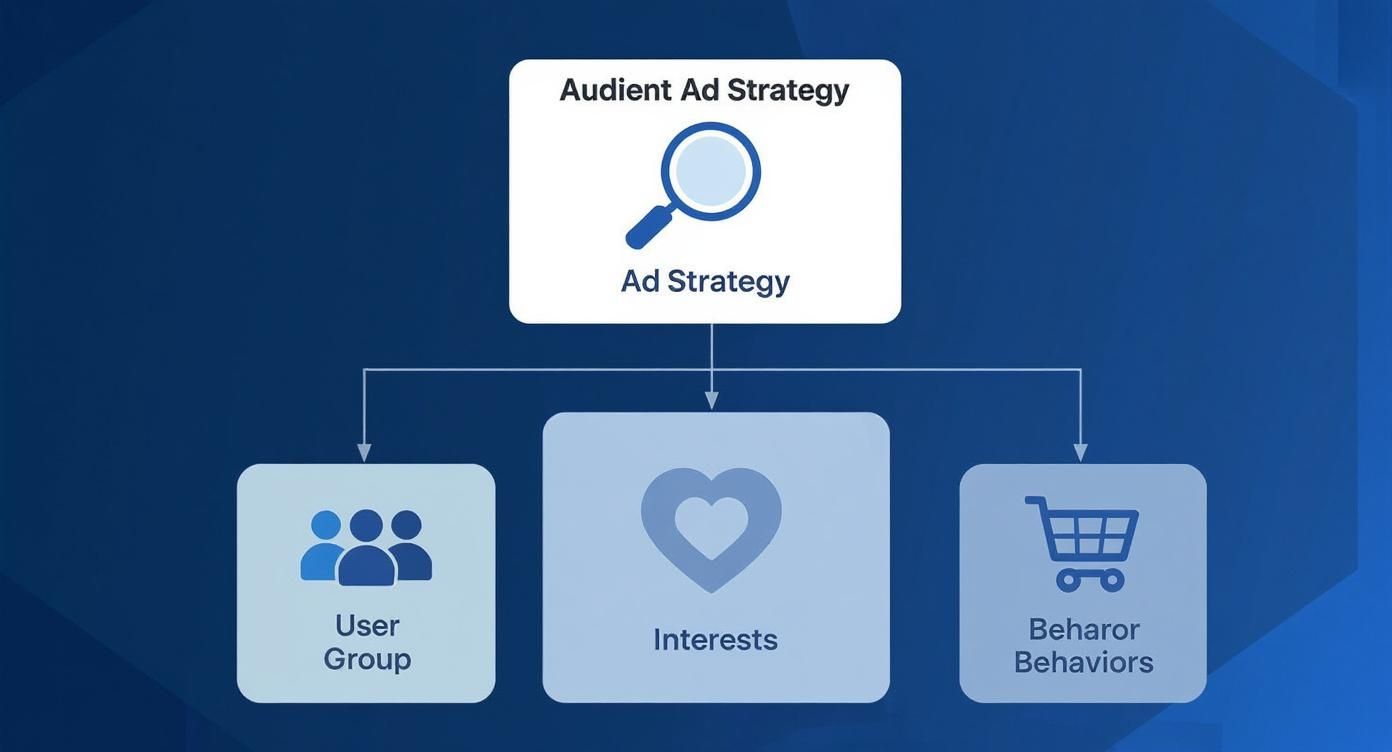
This is the bedrock. Once you understand these three pillars, you can start building the high-performance audiences we’re about to dive into.
Custom Audiences are your bread and butter because they’re made up of people who’ve already raised their hand and shown interest in your brand. This isn't a cold call; it's a warm conversation with a group that’s already listening.
You can build these valuable audiences from a few key sources:
These audiences are absolute gold for retargeting. Imagine showing a "Hey, you forgot this!" ad with a small discount to everyone who abandoned their cart in the last seven days. That kind of precision is what makes the cash register ring.
Once you have a rock-solid Custom Audience (say, a list of your top-spending customers), you can ask Meta to work its magic and find more people just like them. That's exactly what a Lookalike Audience does. The algorithm analyzes the common traits, behaviors, and interests of your source audience and then builds a new audience of people who share those characteristics.
When you create a Lookalike, Meta will ask you to choose a percentage, from 1% to 10%. This number isn’t random; it represents a percentage of the total users in your target country that most closely resemble your original list.
A 1% Lookalike is your smallest, most potent audience. These are the people who are a near-perfect match to your source. A 10% Lookalike is much broader, giving you more reach but with less direct similarity.
For campaigns where conversions are the goal, starting with a tight 1% or 2% Lookalike is almost always the best move. If you’re just trying to get your name out there with a brand awareness campaign, a broader 5% or 10% audience might make more sense.
But what if you build these amazing audiences and your ads still sputter? Understanding delivery issues is often the first step to fixing a broken campaign. If you're running into trouble, check out our guide on what to do when your Facebook ads are not delivering.
Getting your targeting right is only half the battle. Now you have to speak their language. Great ad creative isn't just about a slick design or a clever tagline; it’s about making someone feel like you get them. This is where you turn cold, hard data into a warm, human connection. It's how you transform audience insights on Facebook into ads that actually resonate.
Think of every data point as a creative clue. When your insights show that a huge chunk of your audience loves hiking, that’s your green light to ditch the sterile studio shots. Swap them for images of your product out on a trail, in a natural setting. That one simple change creates an instant, authentic connection.
Your audience data is basically a creative brief written by your customers. It tells you exactly what they care about, how they spend their free time, and what kind of visuals will stop their scroll. Don't just stare at the numbers—look for the story they're telling.
Here are a couple of ways you can translate those insights into powerful creative:
Demographics Drive the Vibe: Is your audience mostly Gen Z? Then your ad better not look like a corporate brochure. We're talking user-generated content styles, quick cuts, vertical video made for Reels, and copy that sounds like a real person talking, not a marketing department.
Interests Inspire the Story: Let’s say your insights reveal a huge overlap with sustainable brands and eco-conscious pages. That's not just an interest; it's a value system. Use it. Your ad copy can highlight your commitment to ethical sourcing, and your visuals can show off natural ingredients or recyclable packaging.
This data-first approach isn't just a nice-to-have; it's essential. In 2025, Facebook remains a powerhouse for social commerce, with nearly half of its audience falling in the prime 25 to 44 age range. User behavior is also shifting dramatically from static posts to video-centric formats like Reels, making visual storytelling more critical than ever. You can explore more detailed Facebook user statistics to see how these trends can sharpen your creative strategy.
Let's make this real. Imagine you sell high-quality, durable backpacks.
Before Insights (The Generic Ad):
You run an ad with a boring studio photo of your backpack on a plain white background. The headline is, "Durable Backpacks for Sale - 20% Off!" It’s functional, sure, but it’s also completely forgettable. It could be from any of a dozen other brands.
After Insights (The Targeted Ad):
You dig into your audience insights on Facebook and discover your ideal customers are young professionals in big cities who love weekend getaways and follow adventure photographers. Suddenly, everything changes.
New Creative: Your ad is now a dynamic video. It opens with someone effortlessly packing the backpack for a weekend trip, then cuts to them navigating a bustling train station. The vibe is aspirational and full of energy, not sterile.
New Copy: The headline is now, "Your Perfect Weekend Escape Starts Here." The body copy highlights features that matter to them, like the padded laptop sleeve for their work machine and the easy-access pockets for train tickets.
See the difference? The product is identical, but the story is tailored specifically to the audience. This is what separates an ad that gets scrolled past from an ad that gets clicked. For more tips on putting these ideas into practice, check out our guide on how to post an advertisement on Facebook.
As you start putting these concepts into practice, you're going to have questions. It's only natural. The world of social media advertising moves fast, and staying curious is how you stay ahead. This section tackles the most common questions advertisers have about audience insights on Facebook, with clear, no-fluff answers to help you get the most out of the platform.
Think of this as your go-to reference when you're in the trenches, digging through the data and wondering what's what. We'll clear up some common points of confusion and give you practical ways to move forward.
If you've been in the game for a while, you probably remember the original, standalone Audience Insights tool. And if you're wondering where it went, you're definitely not alone. Meta officially sunsetted that tool back in mid-2021, but they didn't just get rid of it.
Instead, they broke it up for parts and embedded its most useful features directly where advertisers need them most: inside the Meta Business Suite and Ads Manager. This was a smart move, designed to put the data right next to the tools you use to build and analyze your campaigns.
The big win here is that the data is more actionable than ever. You can find an insight and apply it to a campaign without ever leaving the same environment.
This is the big one, a question every sharp, data-driven marketer should be asking. Facebook's interest and behavioral data is built from an absolutely massive collection of signals. We're talking user-provided info like age and location, on-platform actions like pages liked and ads clicked, and off-platform data from partners and the Meta Pixel, like visits to your website.
It’s one of the most comprehensive consumer datasets on the planet. But it’s crucial to remember that it’s based on signals and predictive modeling—not a perfect, one-to-one map of every single person's brain.
Think of this data as strong directional guidance, not gospel truth. Someone labeled an "Engaged Shopper" is a user who fits a pattern of buying behavior, but it’s no guarantee they’ll buy your product today. The best approach is to always test. Let your own campaign results be the ultimate judge of the insights you find.
Not directly, no. You can't just plug in a competitor's page and get a full breakdown of their audience demographics. The insights inside Meta Business Suite are walled off to your own pages and ad accounts for privacy reasons.
But that doesn't mean you're flying blind. You can do some powerful indirect research that paints a very clear picture of their strategy.
By studying their ad creative, their copy, and their calls to action, you can make some incredibly educated guesses about who they're trying to reach. This gives you priceless clues about their audience and messaging strategy, which you can then use to sharpen your own.
Ready to stop wasting time on manual ad setup and focus on strategy? Lix.so helps you launch entire Facebook ad campaigns in seconds, not hours. Upload creatives in bulk, reuse winning campaign structures with templates, and publish directly to Meta without the tedious busywork. Start your 7-day free trial with Lix.so and see how fast you can scale.
Create hundreds of Facebook Ads campaigns in minutes with Lix.so. Batch creative upload, reusable templates, and automatic campaign generation.
✓ Free for 14 days · ✓ No credit card required · ✓ Cancel anytime

