Published by December 17, 2025 · Reading time 25 minutes · Created by Lix.so
At its core, the Facebook Ad API is a direct line into Meta's advertising powerhouse. It lets developers and large-scale advertisers manage their campaigns programmatically, completely bypassing the standard Ads Manager interface you click through every day.
Think of it as the ultimate toolkit for building custom advertising machinery, automating repetitive tasks, and managing campaigns at a scale that's physically impossible for a human. For any serious, high-volume advertising operation, it’s the key to unlocking real efficiency.
Let's use an analogy. The normal Meta Ads Manager is like a finished car—it has a dashboard, a steering wheel, and pedals. It's reliable, user-friendly, and gets you from point A to point B without much fuss.
The Facebook Ad API, on the other hand, is like being handed a high-performance engine, a chassis, and all the individual components. You get to build the exact vehicle you need. Maybe that's a lightning-fast race car built for pure performance, or maybe it's a heavy-duty truck designed to haul massive loads of campaign data and creatives.
This direct connection isn't for the casual advertiser running a few campaigns. It’s built for teams who find the manual, point-and-click interface too slow, too rigid, or just plain inefficient for their needs. The API allows you to build your own solutions to create, manage, and analyze ads on your own terms.
While anyone with some developer chops can tap into it, the API delivers game-changing advantages to a few specific groups who operate at a massive scale. To really get a feel for its power, it helps to see where it fits in the wider Meta ecosystem, which is covered well in A Developer's Guide to the Facebook API.
The biggest winners are typically:
The core value of the API isn't just about doing things differently; it's about doing things that are simply not feasible with the standard interface. It’s the key to unlocking true operational scale.
In this guide, we're going to cover the whole journey. We'll start with the foundational concepts, walk through the essential authentication steps, and then dive into practical, real-world workflows you can actually use. By the time you're done, you'll see how to turn your ad operations from a grind of manual repetition into a powerful, automated system that drives better results with way less effort.
To really get your hands dirty with the Facebook Ads API, you have to understand how it thinks. The entire system is built on a simple but strict hierarchy. Grasping this structure is the first step to unlocking its power, because every automated action you take—from launching a campaign to uploading a video—is just you talking to these specific building blocks.
Think of your entire ad account as a big digital filing cabinet. This isn't just a cute analogy; it's genuinely the logic the API follows. Every campaign, every audience, every creative is a distinct "object" with its own ID, properties, and relationships. Once you see the system this way, managing hundreds of campaigns stops feeling chaotic and starts feeling like a logical, repeatable process.
This diagram shows the relationship between the Ads Manager you're used to and the API. While Ads Manager is the user-friendly car you drive every day, the API gives you direct access to the engine.
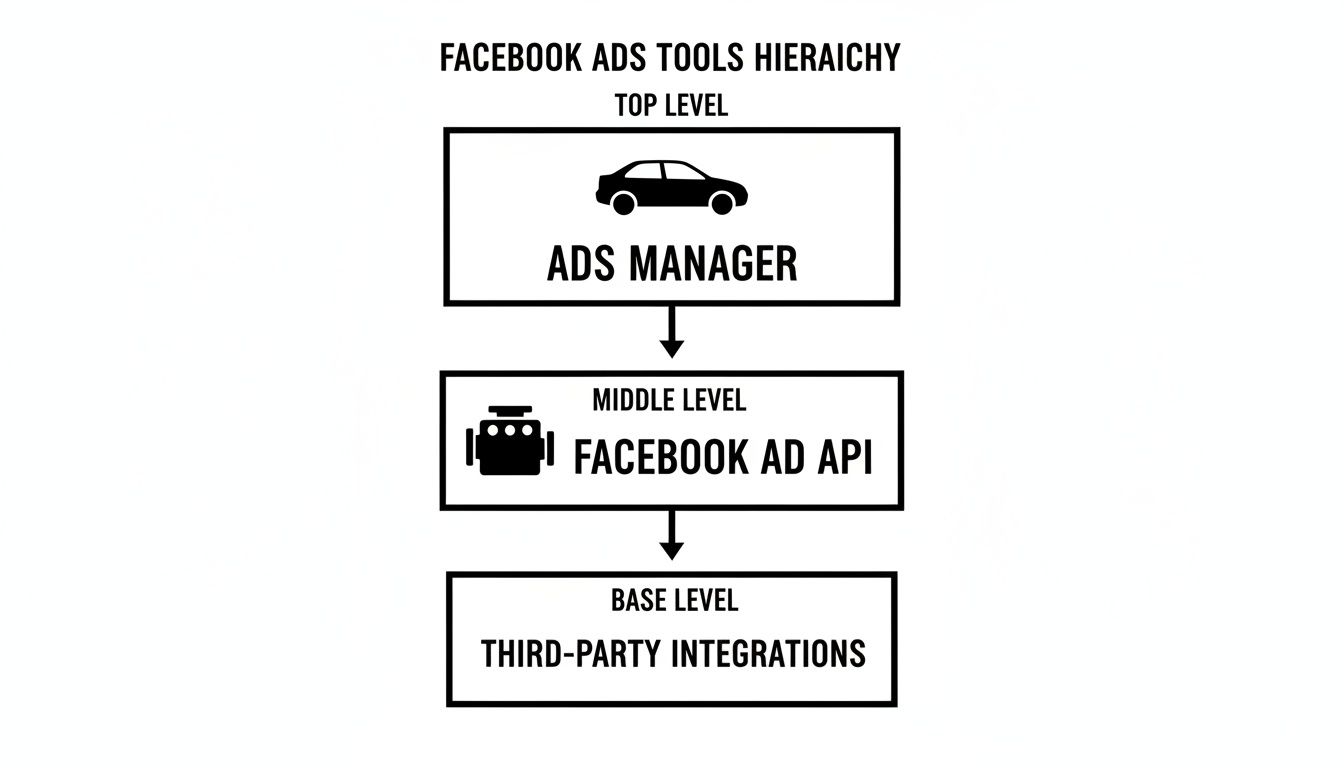
This direct connection is what allows for the kind of custom, high-volume work that’s impossible through the standard interface.
Before we dive into each component, here’s a quick overview of how the main objects relate to each other. This table breaks down the hierarchy and what each piece is responsible for.
| API Object | Analogy | Primary Function |
|---|---|---|
| Campaign | The Filing Cabinet Drawer | Sets the single, high-level advertising objective (e.g., Sales, Leads). |
| Ad Set | The Folder | Defines the rules: audience, budget, schedule, and placements. |
| Ad | The Document | Contains the creative content that your audience actually sees. |
Understanding this flow—where each object lives and what it controls—is non-negotiable for working with the API. Now, let’s look at each one more closely.
At the very top of the food chain sits the Campaign. In our filing cabinet analogy, this is the main drawer. It has one job and one job only: to define a single, overarching advertising objective.
When you create a campaign, you’re not worrying about targeting, creative, or copy just yet. You're simply telling Facebook what success looks like for this entire initiative.
Common objectives you’d set at the campaign level include:
That's it. A campaign is just the container for everything else. Every Ad Set and Ad must live inside a campaign, and they all inherit its core objective.
Inside each Campaign drawer, you have your Ad Sets. Think of an Ad Set as an individual folder within that drawer. This is where all the tactical decisions happen. Each folder contains a specific set of rules that dictate how, where, when, and to whom the ads inside it will be shown.
An Ad Set controls three critical things:
This structure is what makes testing so efficient. Say you want to test the same ads on two different audiences—one in California and another in New York. You don't need two separate campaigns. You just create one "Sales" campaign and put two Ad Set "folders" inside it, each with its own location targeting.
The Ad Set is the control panel. Any change you make here, like bumping the budget or tweaking the audience, automatically applies to every single Ad stored within that folder.
Finally, inside each Ad Set folder, you have the Ads. These are the individual documents—the actual images, videos, and copy that your audience sees and interacts with.
In the API, each Ad is made up of two main parts:
adcreative object: This is the media itself. It bundles together your image or video, the primary text (ad copy), the headline, and the call-to-action button.ad object: This is what links that creative to a specific Ad Set and controls its status (like ACTIVE or PAUSED).You can stick multiple Ads inside a single Ad Set, which is perfect for A/B testing creatives. For instance, you could test a video ad against a carousel ad to see which one drives more sales for your California audience. This simple, three-tiered relationship—Campaign contains Ad Sets, and Ad Sets contain Ads—is the unbreakable logic of the entire Facebook Ads API.
Once you've wrapped your head around the core ad objects, the next big step is actually connecting your app to Meta’s world. Getting into the Facebook Ad API isn't as simple as logging into a website. It requires a secure, programmatic handshake to make sure only authorized applications can touch your ad accounts. Security and proper permissions are baked in from the very beginning.
This whole process is governed by a framework called OAuth 2.0.
Think of OAuth as a digital valet key. You can give a valet a key to park your car, but that key won't open your glove box or trunk. In the same way, OAuth lets your application perform specific actions on your behalf—like creating campaigns or pulling reports—without ever needing your actual Facebook password.
It works by issuing access tokens, which are just secure, temporary credentials that grant your app the specific permissions it needs. This is a critical security layer that keeps your main account credentials safe while still allowing for powerful automation.
Before you can make your first API call, you have to complete a few foundational steps inside Meta's developer environment. This initial setup gets your application officially recognized and gives it a legitimate way to ask for the permissions it needs.
The journey starts at the Meta for Developers portal, where you'll register your application.
ads_management to create and edit campaigns, or just ads_read if you only need to view performance data.It's a best practice to request only the permissions your application absolutely needs. Asking for unnecessary access can raise red flags for users and is just bad security. This principle of least privilege is central to building integrations people can trust.
Nailing these initial steps creates a secure foundation for everything that follows. Proper setup is also the key to effective campaign monitoring. You can learn more about the best methods for tracking ads on Facebook in our detailed guide. This ensures that once your app is connected, you can get a clear view of its performance and impact.
While your Developer App holds the technical key, the Meta Business Manager (now called Meta Business Portfolio) is the administrative command center that controls the lock. Business Manager is where you centralize all your valuable advertising assets in one secure place.
Think of it as the central nervous system for your entire advertising operation. It keeps everything organized and accessible.
For the Facebook Ad API to function, your application's system user must be granted explicit permissions to the ad accounts it needs to manage within Business Manager. For instance, if you want your app to automate campaigns for a client, you first need to add their ad account as an asset in your Business Manager. Then, you have to explicitly assign your app permission to access it.
This separation of duties is vital. The Developer App handles the technical authentication, while Business Manager governs the business-level permissions. If you don't have the correct setup in both places, your API calls will fail, even with a perfectly valid access token. This structure ensures a developer can't accidentally wander into an ad account they haven't been explicitly cleared to manage, providing a crucial layer of organizational security.
This is where the rubber really meets the road with the Facebook Ad API. Understanding the individual building blocks is one thing, but the real magic happens when you start stringing them together into workflows that would be completely impossible to manage by hand.
We're going to walk through two game-changing automation strategies. These are the kinds of workflows that separate reactive campaign managers from proactive system builders. Instead of getting stuck in the endless click-and-upload cycle of Ads Manager, you can build engines that run your advertising for you, operating 24/7 with perfect precision.

This level of automation is exactly why tools like Lix.so were created—to tap into the API's power and make these advanced workflows accessible without needing a team of developers.
Let's imagine you're an e-commerce brand launching a new product line. You've got 50 different images and videos ready to go. To find the winner, you want to test each creative with three different ad copy variations and two different headlines.
If you were doing this manually, you'd be building 300 individual ads. It's a mind-numbing task that could easily take a full day and is practically guaranteed to have a few copy-paste errors.
But with the Facebook Ad API, this becomes a simple, programmatic job. You can write a script that just loops through all your assets and creates every possible combination automatically.
Here’s how that usually breaks down:
adcreative objects.This bulk creation workflow is the foundation of high-velocity creative testing. It’s what allows teams to test more ideas, find winning ads faster, and scale campaigns with an agility that manual methods simply can't touch.
Beyond just creating ads, the API really flexes its muscles in ongoing campaign management. By connecting the API to your performance data, you can build smart, rule-based systems that act as your tireless co-pilot, making optimizations 24/7 based on real-time metrics.
This is the heart of true advertising automation. Instead of manually refreshing your dashboards every few hours, you create rules that trigger specific actions when certain conditions are met. It’s a core feature we dive into deeply in our complete guide to Facebook Ads automation, which shows you how to set up these powerful systems step-by-step.
A classic example is a script that runs every hour to check your KPIs. If an ad's Cost Per Acquisition (CPA) creeps above a set threshold, the script instantly pauses it. It can even be told to reallocate that ad's budget to your top performers.
Here are a few other powerful examples of what rule-based automation can do:
To get the most out of these strategies, many advertisers pair the Facebook Ad API with specialized tools. Understanding the landscape of AI Marketing Software for Better Campaigns can give you a better sense of what's possible. These systems empower you to operate at a scale and speed far beyond what any human can manage alone.
So, how does this work under the hood? Executing these workflows means making POST and GET requests to specific API endpoints.
To create a new campaign, for instance, you'd send a POST request to the act_{ad-account-id}/campaigns endpoint. To build out your ads, you’d use endpoints like /adcreatives to upload your assets and /ads to assemble the final product.
For the automation side, your scripts would constantly make GET requests to the /insights endpoint to pull fresh performance data. That data then fuels the logic in your rules engine, which decides whether to make a change—like sending a POST request to update an ad's status or an ad set's budget. This continuous loop of fetching data, analyzing it, and taking action is the very heartbeat of any effective API-driven automation strategy.
When you start working with the Facebook Ad API at any serious scale, you quickly learn you have to play by Meta's rules. Think of the API as a busy highway system. To keep traffic flowing smoothly for everyone and prevent total gridlock, Meta has a traffic control system called rate limiting.
This isn't a penalty; it’s just a practical way to maintain the platform's stability. If you bombard the API with too many requests in a short time, it'll put you in a temporary time-out and send back an error. Understanding these limits isn’t just some technical footnote—it's absolutely fundamental to building a professional-grade tool that won't crumble under pressure. Trying to ignore them is like trying to ram your way through a traffic jam; you won't get there any faster, and you'll just create a bigger mess.
Meta has a few different types of rate limits, and they aren't always the same for everyone. The limits can change based on the app you're using, the user making the calls, and especially the ad account itself. For example, a high-spending, well-established ad account will typically have a much higher threshold than a brand new one.
The most common limit you'll run into is based on the number of API calls your application makes within a rolling one-hour window. If you cross that line, you’ll get an error, usually something like "(#80004) There have been too many calls from this ad-account." That's your clear signal to slow down. The trick is to design your system from the get-go to be efficient and respectful of these limits, not just scrambling to fix things once the errors start rolling in.
The goal isn’t to see how close you can get to the limit without going over. It’s to build efficient systems that achieve your goals with the fewest API calls possible. Quality over quantity is the name of the game.
Building a scalable integration is about more than just making API calls; it’s about being smart and efficient. By adopting a few key best practices, you can slash your call volume, boost performance, and build a much more resilient system.
Here are the essential strategies you need to put into practice:
Pulling performance data is the heartbeat of any advertising strategy. The Facebook Ad API gives you a direct line to this vital information through its Insights API endpoint. This is how you programmatically grab all those essential metrics—impressions, clicks, cost-per-result, conversions—that form the bedrock of your reporting dashboards and optimization engines.

But here's a secret that trips up a lot of developers: building reliable reports isn't just about pulling numbers. You have to understand the nature of the data itself, and the fact that it isn't always set in stone.
If you dig into Meta's own documentation, you’ll find a crucial detail: many key performance indicators are marked as "estimated" or "in-development." Metrics like ad spend and certain conversion actions can subtly change as Meta’s algorithms evolve or as data attribution models get updated between API versions.
What does this mean in practice? A report you run today might show slightly different numbers if you run the exact same query a week from now. You can learn more straight from the source in Meta's official documentation on API insights and reporting.
This variability can be a real headache, especially when you need to compare data over time. It makes it essential to build resilient data pipelines that can account for these small shifts without breaking your entire reporting system.
The Insights API provides incredibly granular data, but treating every number as absolute truth is a common mistake. True reliability comes from understanding the data's nature and building systems that can handle minor fluctuations without breaking.
A key part of this is knowing which metrics are solid and which are more fluid. The Insights API returns a mix of raw, directly counted events and more complex, modeled data.
| Metric Category | Examples | Key Consideration |
|---|---|---|
| Directly Counted Metrics | impressions, clicks, spend |
Generally stable and reliable. These are raw counts of events that occurred. Spend can sometimes be adjusted slightly post-delivery. |
| Attributed Action Metrics | actions (e.g., purchases, leads), cost_per_action_type |
Highly dependent on attribution windows and modeling. These are the most likely to be updated as Meta refines its data. |
| Estimated & Unique Metrics | reach, frequency, unique_clicks |
These are statistical estimates designed to de-duplicate users across devices. They are inherently not exact counts and can vary. |
| In-Development Metrics | Varies by API version | Meta often flags new metrics as "in-development." Use these with caution in production reports until they are fully stabilized. |
Understanding these distinctions is the first step toward building reports you can actually trust. The goal is to create a system that is both accurate and durable.
To build reporting systems that last, you need to move beyond simple, one-off API calls. Adopting a more structured approach ensures your data stays consistent and trustworthy, even as the API itself changes. Our guide on FB Ads reporting dives deeper into advanced strategies for creating robust dashboards.
Here are a few best practices to get you started on a solid foundation:
Use Asynchronous Jobs for Large Reports: Ever tried pulling a year's worth of data and had the connection time out? When you need extensive historical data or complex breakdowns, synchronous calls are a recipe for failure. Instead, use asynchronous jobs. You request the report, the API processes it in the background, and then pings you when it's ready. This ensures you get the complete dataset without errors, every time.
Warehouse Your Data: Don't rely on hitting the API for historical data every time you need it. A much better approach is to pull your performance data daily and store it in your own database or data warehouse (like BigQuery or Snowflake). This creates a stable, consistent historical record that you control, completely insulated from any future API changes or data recalculations on Meta's end.
Cross-Validate with Internal Systems: The ultimate source of truth should always be your own systems. Whenever you can, cross-reference the metrics from the Insights API with your internal tracking, like sales data from your Shopify store or lead data from your CRM. This simple step helps you spot discrepancies early and build a much more complete, and accurate, picture of your campaign performance.
Even after you get the hang of the basics, the Facebook Ad API has its quirks. Let's tackle some of the most common questions that pop up for developers and marketers alike, so you can clear up any confusion and get back to building.
This is a big one. The Marketing API and the Conversions API (CAPI) are two different tools that work together, but they do completely different jobs.
Here’s the simplest way to think about it:
So, you use the Marketing API to build and run the campaigns, and you use the Conversions API to accurately measure what those campaigns actually achieve.
Directly? No. The API is fundamentally an interface for software, so you need to know a programming language to make calls to it.
But that absolutely doesn't mean you're locked out. Non-coders can tap into the full power of the API by using third-party tools built on top of it. Platforms like Lix.so handle all the complicated code in the background, giving you a simple, visual interface to automate campaign creation, manage creatives in bulk, and generate reports without ever writing a line of code. You get the power of the API without the learning curve.
When an API call goes wrong, your first stop should always be the error message Meta sends back. It almost always includes an error code and a brief explanation. Just pop that error code into the official API documentation, and it will usually point you right to the problem—things like a misspelled parameter or a missing permission.
Before you go too deep, always double-check your access token. Is it still valid? Does it have the right permissions, or "scopes," for what you're trying to do (e.g., ads_management)? Finally, it's worth a quick glance at Meta's API status dashboard just to make sure the problem isn't on their end.
Ready to stop wasting hours on manual campaign builds? Lix.so uses the power of the Facebook Ad API to launch your campaigns in seconds. Upload creatives in bulk, reuse winning campaign structures with templates, and eliminate frustrating import errors. Start your free 7-day trial and see the difference.
Create hundreds of Facebook Ads campaigns in minutes with Lix.so. Batch creative upload, reusable templates, and automatic campaign generation.
✓ Free for 14 days · ✓ No credit card required · ✓ Cancel anytime

