Published by December 7, 2025 · Reading time 20 minutes · Created by Lix.so
Setting up auto Facebook ads is all about building a system. Instead of manually tweaking bids and pausing ads all day, you create a framework of rules and templates that manages your campaigns for you. It handles everything from creative testing to budget scaling, freeing you up to focus on high-level strategy instead of getting buried in the weeds.
Moving to automated Facebook advertising is a real mindset shift. It’s not about finding some magical "set it and forget it" button. It’s about becoming an architect. Your job is no longer to be the hands-on manager for every single campaign, but the engineer who designs an intelligent workflow to handle creative testing, audience discovery, and budget optimization on its own.
This foundation is what makes it possible to manage massive campaigns with precision. For an ecommerce brand with hundreds of products or an agency juggling dozens of client accounts, this is a total game-changer. It breaks through the bottlenecks that kill growth, like manually uploading 50 creatives or pausing underperforming ads one by one.
Before we jump into the tools and tactics, you have to get the core principles right. The goal isn’t to remove the human element; it’s to amplify it. You’re evolving from doing the work to designing the system that does the work.
Every successful automation starts with a single, clear goal. Are you trying to speed up creative testing? Maintain a target ROAS no matter what? Or just protect your budget from burning through cash on bad ads? Figure this out first. It'll save you from the common trap of over-automating just for the sake of it.
A common mistake is building complex rules just because you can. Your system should be as simple as possible but as complex as necessary to hit your main goal. A single, well-defined rule is often far more powerful than a dozen unfocused ones.
With a clear objective in mind, you can build a system that truly works for you. Your automated workflows become a direct extension of your marketing strategy, scaling your best decisions 24/7.
There's no denying the sheer power of Meta's advertising platform. With ad revenue projected to hit $160.38 billion in 2024 and a potential audience of 2.11 billion users, it’s a channel you can't ignore. The scale is massive, as you can see from these latest Facebook advertising statistics.
But even with all that tech, human strategy is your most valuable asset. Automation is brilliant at executing tasks based on the logic you give it, but it can’t think for itself. It can’t:
Your job is to be the brain of the operation. You provide the strategic direction, the creative vision, and the critical oversight that guides your automated system to victory.
This is where you build the engine for your entire ad account. To really nail auto Facebook ads, you have to ditch the one-off campaign mindset for good. Think like an architect, not a handyman. You're creating a core structure that can be reused and scaled endlessly, whether you're using Meta's built-in rules or a more powerful third-party tool.
The goal isn't just to make one campaign; it's to design a master blueprint for all future campaigns. This means setting up standardized templates that map to each stage of your customer's journey.
A solid automated architecture should be built around three core campaign types. This structure isn't random—it perfectly mirrors how a customer goes from a complete stranger to a loyal fan.
By creating distinct templates for each stage, you ensure every ad has a crystal-clear job. This clean, organized approach stops audiences from overlapping and makes your performance data way easier to analyze.
The real magic of an automated architecture isn't just saving time. It's about enforcing strategic discipline. A templated structure forces you to be intentional about who you're targeting and why, which makes your campaigns dramatically more efficient.
You can't scale chaos. A scalable system needs ruthless organization, and that’s where dynamic naming conventions become your best friend. Instead of manually typing out an ad set name like "US - Men 25-34 - Interests," you build a dynamic template that does the work for you.
A smart naming convention might look something like this: {{Country}}-{{Gender}}-{{AgeRange}}-{{AudienceType}}-{{Objective}}.
When you spin up a new ad set, the system automatically fills in those placeholders, creating perfectly clean names like US-M-2534-Lookalike1-Conversions. This makes writing automation rules a breeze. For example, you could instantly build a rule that boosts the budget for any ad set containing "Lookalike1" and "Conversions" that hits a ROAS above 3.
This level of organization is the foundation for any serious automation. If you want to get into the technical weeds, you can explore how the Facebook Ads API facilitates these automated workflows, giving you programmatic control over every single campaign element.
Let's say an ecommerce store is launching a new line of running shoes. With a pre-built "New Product Launch" architecture, the whole process becomes almost automatic.
Suddenly, the marketer’s job shifts from manually building dozens of ad sets to simply activating one intelligent, pre-built system. This is the whole point of building a robust architecture for your auto Facebook ads—it saves you countless hours and kills the expensive human errors that always sneak in during manual setups.
The single biggest bottleneck in scaling your ad campaigns isn't your strategy—it's the soul-crushing, repetitive task of manually uploading creatives and writing ad copy. This is where most advertisers lose all their momentum.
The solution is to build a system that completely disconnects creative production from campaign launching. Think of it as an assembly line that moves your assets directly into active ads, all without you ever needing to step in manually.
It all starts with a smart, logical naming convention. Instead of saving files like image_final_v2.jpg, you adopt a descriptive format that actually contains targeting information. This simple shift is the key that unlocks serious automation for your auto Facebook ads.
Let's say you're an ecommerce brand that sells t-shirts. A smart filename for one of your lifestyle photos could look something like this: Tshirt-Red_Lifestyle_US-Male-25-34_Prospecting.
This isn't just a random label; it's a complete set of instructions. Each part of the name, separated by an underscore, represents a piece of critical data:
When you upload this file into an automation tool (or even just a connected Google Drive folder), the system reads the filename and immediately knows what to do. It automatically maps the image to the correct campaign and ad set. Just like that, the image is live in a prospecting campaign targeting men aged 25-34 in the US.
You just launched a new ad without ever opening Ads Manager.
The goal is to make your creative assets self-aware. By embedding targeting and placement data directly into the filename, you empower automation tools to do the heavy lifting. A multi-step manual process becomes a single file upload.
You can apply the exact same logic to your ad copy. Using a simple spreadsheet, you can create hundreds of variations of headlines, body text, and calls-to-action. Each row can be tagged with specific attributes that link it to certain creative types or audiences.
For example, you might have one set of headlines that works best with your "Lifestyle" photos and a completely different set for your "Product-Focused" shots. An automation platform can then mix and match these elements on the fly, generating a massive volume of ad combinations to test. This lets you find winning combinations at a scale that would be completely impossible to manage by hand.
If you want to dive deeper into structuring your assets, check out our guide on the best practices for Facebook Ads creative management.
This kind of structured approach fits perfectly into a full-funnel campaign architecture, giving you a framework for true creative automation.
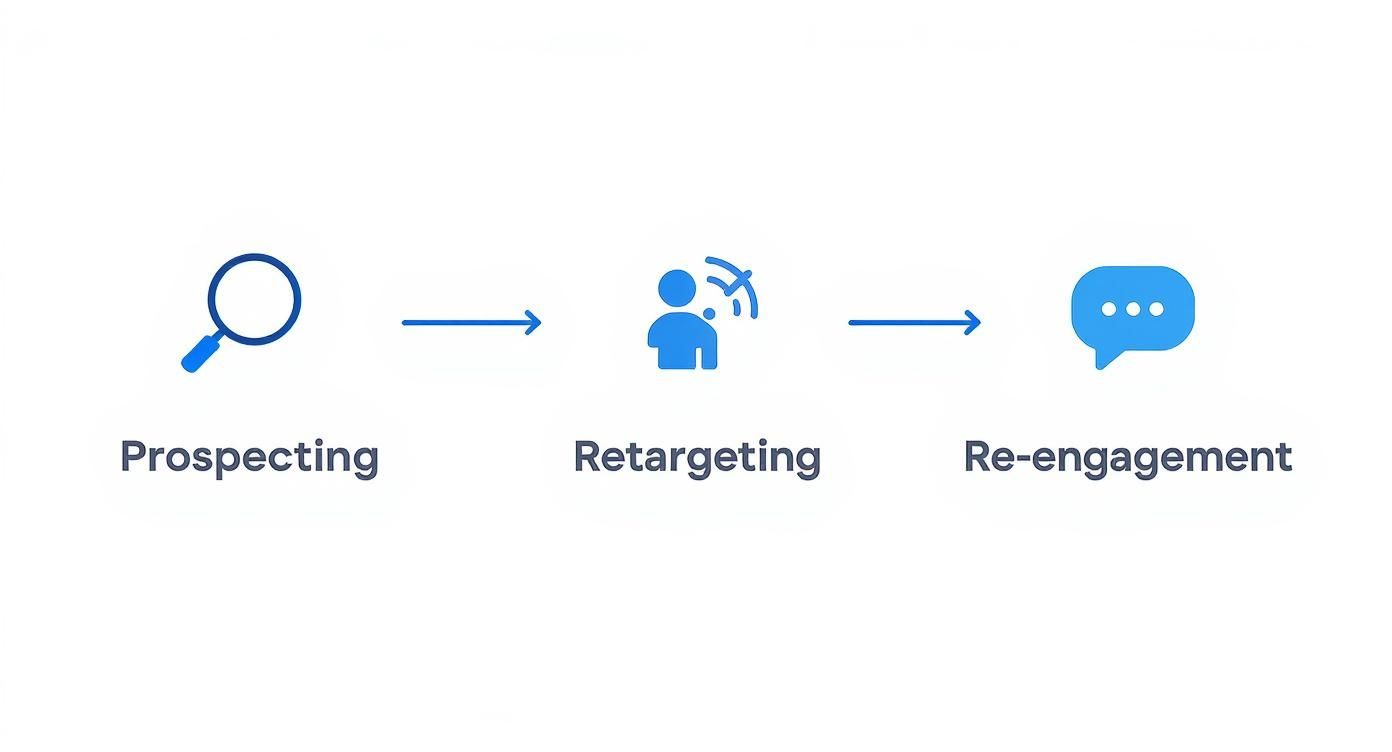
Each stage of the funnel—from prospecting to re-engagement—demands different creative angles and messaging. Your automated workflow handles this effortlessly by mapping the right assets to the right campaign type.
To illustrate the time savings, let's compare the manual process to an automated one for managing just 10 new creatives.
| Task | Manual Process (Estimated Time) | Automated Process (Estimated Time) |
|---|---|---|
| Uploading Creatives (10 files) | 10 minutes (Uploading one by one into Ads Manager) | 2 minutes (Bulk upload to a connected folder) |
| Creating Ad Variations | 30 minutes (Duplicating ads, assigning creatives) | 5 minutes (System automatically creates variations) |
| Setting Targeting | 15 minutes (Applying audience settings to each ad) | 0 minutes (Read directly from the filename) |
| Writing Ad Copy | 20 minutes (Copy-pasting headlines/text) | 5 minutes (Mapping from a pre-filled spreadsheet) |
| Review & Publish | 10 minutes (Checking each ad for errors) | 3 minutes (Quick review of the automated setup) |
| Total Time | ~85 minutes | ~15 minutes |
As you can see, the efficiency gains are substantial. What takes over an hour manually can be accomplished in about the time it takes to grab a coffee.
This level of creative agility is more crucial than ever, especially with the platform's heavy shift toward short-form video. Video content absolutely dominates user attention, and formats like Facebook Reels now account for nearly a third of the platform's entire ad inventory.
Recent data even shows that video ads on Reels can see a 35% higher click-through rate than other formats. This trend just highlights the need for a system that allows for rapid, continuous creative testing.
By systemizing your creative workflow, you're essentially building an assembly line for testing. New ideas move from concept to a live campaign in minutes, not hours. This frees you from the drudgery of repetitive tasks and lets you focus entirely on what truly matters: developing a winning creative strategy.
Alright, your campaigns are live and new creatives are in the mix. Now it’s time to build the safety net—and the scaling engine—for your account. This is where you create simple "if-this-then-that" rules that stop you from wasting money and automatically double down on what’s working.
Think of it as turning your Ads Manager into a partner that works for you 24/7.
Setting up smart auto Facebook ads rules isn't about writing complex code. It’s about defining your non-negotiables. What's the absolute maximum you're willing to pay for a purchase? At what point do you know an ad set is a clear winner? Answering these questions is the key to effective, hands-off optimization.
First things first, let's play defense. This first set of rules has one job: stop bad ads from burning through your cash before you've even had your morning coffee. These rules are your automated kill switch for underperformance.
A classic example is a rule based on Cost Per Purchase (CPP). If your target is $40, you could create a rule that automatically pauses any ad spending more than $60 without a single purchase. This gives the ad a fair shot but cuts it off before it becomes a money pit.
Here are a few essential defensive rules to get you started:
Your defensive rules aren't about finding winners; they're about quickly and efficiently eliminating losers. This simple act of automated pruning ensures your budget is consistently reallocated to ads with the highest potential.
Once your budget is protected, it's time to build the rules that pour gasoline on the fire. These are the rules that spot a spark of success and automatically increase the investment, letting you capitalize on winning trends without having to be glued to your screen.
The most common scaling rule is based on Return On Ad Spend (ROAS). For instance, you could create a rule that gives a 20% budget bump to any ad set with a ROAS above 3.5 over the last three days. This allows you to methodically feed your best performers.
Of course, for these rules to work properly, you need solid data. We've got a whole guide on tracking ads on Facebook that covers how to set up the right infrastructure.
Consider adding these powerful scaling rules to your playbook:
By combining defensive and scaling rules, your auto Facebook ads setup starts to mimic the real-time decisions of a seasoned media buyer. Your account becomes a self-optimizing system that protects your downside and pushes your upside, day and night.
Even the best-laid plans go awry, and a well-oiled system for auto Facebook ads is no exception. At some point, an automation rule will fire when it shouldn’t, or a simple creative mapping error will send the wrong image to a crucial audience. Learning how to quickly debug these hiccups is what separates a good media buyer from a great one.
When a rule misfires, the knee-jerk reaction is to just delete it and start over. Don't. Take a moment to investigate. Check the rule's conditions and, more importantly, the timeframe it’s analyzing. A classic mistake I see all the time is setting a budget-scaling rule to evaluate performance over the "last 24 hours." That's often not enough data for a stable read. Bumping it to the "last 3 days" can prevent jerky, premature decisions.
Another gremlin that pops up frequently is a creative mapping error, especially if you’re using filename-based automation. Always, always double-check your naming convention for typos or extra spaces. A tiny error like US-Male-25-34 instead of the required US-M-25-34 is enough to stop an entire batch of ads from ever seeing the light of day.
Once you're comfortable debugging the basics, it's time to get proactive. This is where you can build an ad account that’s highly responsive to what's happening in your business right now. The key to this is a neat little tool called a webhook.
Think of a webhook as a simple messenger that lets your different apps talk to each other automatically. For an ecommerce brand, this is an absolute game-changer. For instance, you can set up a webhook that connects your inventory management system directly to your ad platform.
Here's how that might look in the real world:
Low Stock Trigger: A popular product's inventory drops below 50 units. The webhook instantly tells your ad platform to trigger a rule, which then automatically dials back the budget for that product's specific ad set.
Back-in-Stock Trigger: The moment that product is restocked, another webhook fires. This time, it reactivates the campaign and maybe even gives it a budget boost to capitalize on pent-up demand.
This simple connection stops you from pouring money into advertising products people can't even buy—one of the most common and costly mistakes in ecommerce.
By connecting your ad automation to real-world business data like inventory levels or sales trends, you’re no longer just optimizing for metrics like CTR or CPA. You’re optimizing for actual business outcomes, which is the ultimate goal of any advertising effort.
The final frontier of automation is layering multiple conditions together to create truly intelligent, bulletproof budget management. Instead of a single, simple rule that just cranks up the budget based on ROAS, you can build a multi-layered rule that requires several conditions to be true at the same time.
For example, a more advanced scaling rule might only increase an ad set's budget by 15% if all of these conditions are met:
This multi-condition approach ensures you're scaling based on a complete picture of performance. It makes your auto Facebook ads setup not just efficient, but genuinely smart.
Jumping into automation for the first time always brings up questions. It's a big move, so it’s smart to get clear on the fundamentals before you dive in. Here are the straight-up answers to the most common things advertisers ask when they start building automated campaigns.
We'll clear up any confusion and give you practical solutions for the challenges that pop up most often.
Think of Meta’s built-in automated rules as your training wheels. They’re a fantastic starting point for any advertiser, running on simple “if this, then that” logic based on standard metrics like your CPA or ad frequency. They are perfect for learning the absolute basics of automation.
But when you're ready to get serious, dedicated third-party tools are where the real power is. They unlock multi-condition rules, seamless integrations with outside data sources (like a Google Sheet or even your live inventory system), and much more sophisticated workflows for managing creatives.
My advice? Master Meta's rules first. Get a feel for the core concepts. Once you find yourself saying, "I wish I could do X, but the native rules can't handle it," you'll know it's time to graduate to a specialized automation tool.
There's no single magic number here, but the core principle is simple: your budget has to be big enough to feed the algorithm enough data to make smart calls. If you starve it of data, your rules might fire off too early or not at all, leading to messy, ineffective optimization.
A solid rule of thumb is to aim for a daily budget that can generate at least 30-50 of your target conversion events per ad set, each week.
Let’s say your target Cost Per Purchase is $20. To hit that weekly goal, you’d want a daily budget of at least $100 per ad set. This volume gives your automation a statistically significant data set to work with, making its decisions reliable instead of random.
Absolutely not. And it never will.
Automation is a tool to empower a human media buyer, not replace them. Its real strength is taking over the repetitive, soul-crushing tasks that eat up a marketer’s day—pausing bad ads, bumping budgets on winners, and launching new creative tests.
This frees up the human strategist to focus on the high-level work that machines just can't do. We’re talking about building the overarching campaign strategy, spotting complex market trends, understanding the subtle psychology of your customer, and—most importantly—dreaming up compelling creative.
The best results will always come from a powerful partnership: human creativity combined with machine efficiency.
Ready to stop wasting hours on manual campaign setups? With Lix.so, you can launch hundreds of Facebook ads in seconds. Our platform automates creative ingestion and uses reusable templates to build your campaigns, freeing you to focus on strategy. Start your 7-day free trial and see the difference at https://lix.so/en.
Create hundreds of Facebook Ads campaigns in minutes with Lix.so. Batch creative upload, reusable templates, and automatic campaign generation.
✓ Free for 14 days · ✓ No credit card required · ✓ Cancel anytime

