Published by December 10, 2025 · Reading time 19 minutes · Created by Lix.so
This Facebook Ads Manager tutorial is your roadmap to creating, managing, and optimizing campaigns that actually deliver. Think of Ads Manager as the central command center for everything you do on Facebook and Instagram—it’s where you control targeting, budgets, creative, and, most importantly, track your results.
Jumping into Ads Manager for the first time can feel like stepping into the cockpit of a 747. There are buttons, dials, and data everywhere. But don't get intimidated. Once you understand the basic layout, you'll feel right at home. We’ll break it down piece by piece.
The reason this tool is so powerful is its sheer scale. You're tapping into a social media ecosystem with over 3 billion active monthly users globally as of 2025. That's an audience of roughly 40% of the world's population, making it one of the most potent advertising platforms ever created. You can find more details on its massive user base in recent industry reports.
The main dashboard gives you a bird's-eye view of your performance but also lets you zoom in on the nitty-gritty details. You'll spend almost all your time navigating through three core tabs, which form the hierarchy of every ad account.
Here’s what the main dashboard looks like. It’s your home base for managing everything.
This view gives you a quick snapshot of what’s working and what isn’t, showing key metrics like budget, results, and total spend at a glance.
Getting this structure right is non-negotiable. For example, a single "Winter Sale" campaign might have two ad sets: one targeting past website visitors and another targeting a lookalike audience. Each of those ad sets could then contain five different ads, each testing a unique video or image.
My two cents: Don't drown in the data. The first thing you should do is customize your columns to show only the metrics that matter for your campaign's objective. I usually stick to Cost Per Result, ROAS (Return on Ad Spend), and CTR (Click-Through Rate). This simple tweak cuts through the noise and keeps you focused on what's actually moving the needle, saving you from the all-too-common trap of analysis paralysis.
Okay, now that you know your way around the dashboard, it’s time for the fun part: building your first campaign. This is where your marketing strategy stops being a document and starts becoming a real, tangible thing inside Facebook Ads Manager.
Every single successful campaign I've ever run started with one crystal-clear purpose. Your first step is to translate that business goal into an objective Meta's algorithm can actually understand.
This decision is, without a doubt, the most critical one you'll make. It’s you telling Meta’s incredibly powerful delivery system exactly what you want people to do. And trust me, that system works—it’s why over 10 million active advertisers globally helped generate around $118.96 billion in ad revenue in 2023. You can dig into more of those Facebook advertising statistics on dataally.ai if you're curious.
Facebook keeps things simple by organizing objectives into the three classic marketing funnel stages. Let's break down what they actually mean for your business.
Choosing the right objective tells Meta who to show your ads to. If you want sales, pick 'Sales'. If you want clicks, pick 'Traffic'. The algorithm is smart, but it's not a mind reader—you have to give it the right instructions from the very beginning.
| Objective Category | Specific Objective | Best Used For |
|---|---|---|
| Awareness | Reach, Brand Awareness | Getting your brand in front of as many new eyeballs as possible. Perfect for a new business launch or a new product announcement where you just need to build initial recognition. |
| Consideration | Traffic, Engagement, App Installs, Video Views, Lead Generation | Driving actions that signal interest. Think sending people to a blog post (Traffic), getting likes and comments (Engagement), or collecting email addresses with a form (Leads). |
| Conversion | Sales, Catalog Sales | Driving valuable actions on your website or app. This is the money-maker. If you're running an e-commerce store and want to sell a product, Sales is almost always the right choice. |
A classic rookie mistake is choosing 'Traffic' when you really want sales. Sure, traffic is cheap, and you'll see a lot of clicks. But Facebook will go out and find people who love to click on links, not necessarily people who love to pull out their credit cards. If your goal is to sell something, always start with the 'Sales' objective.
With your objective locked in, the next step is building a logical campaign structure. A clean hierarchy isn’t just about staying organized; it makes it infinitely easier to see what’s working (and what isn’t) when you analyze performance later.
The structure is simple: Campaigns hold Ad Sets, and Ad Sets hold Ads.
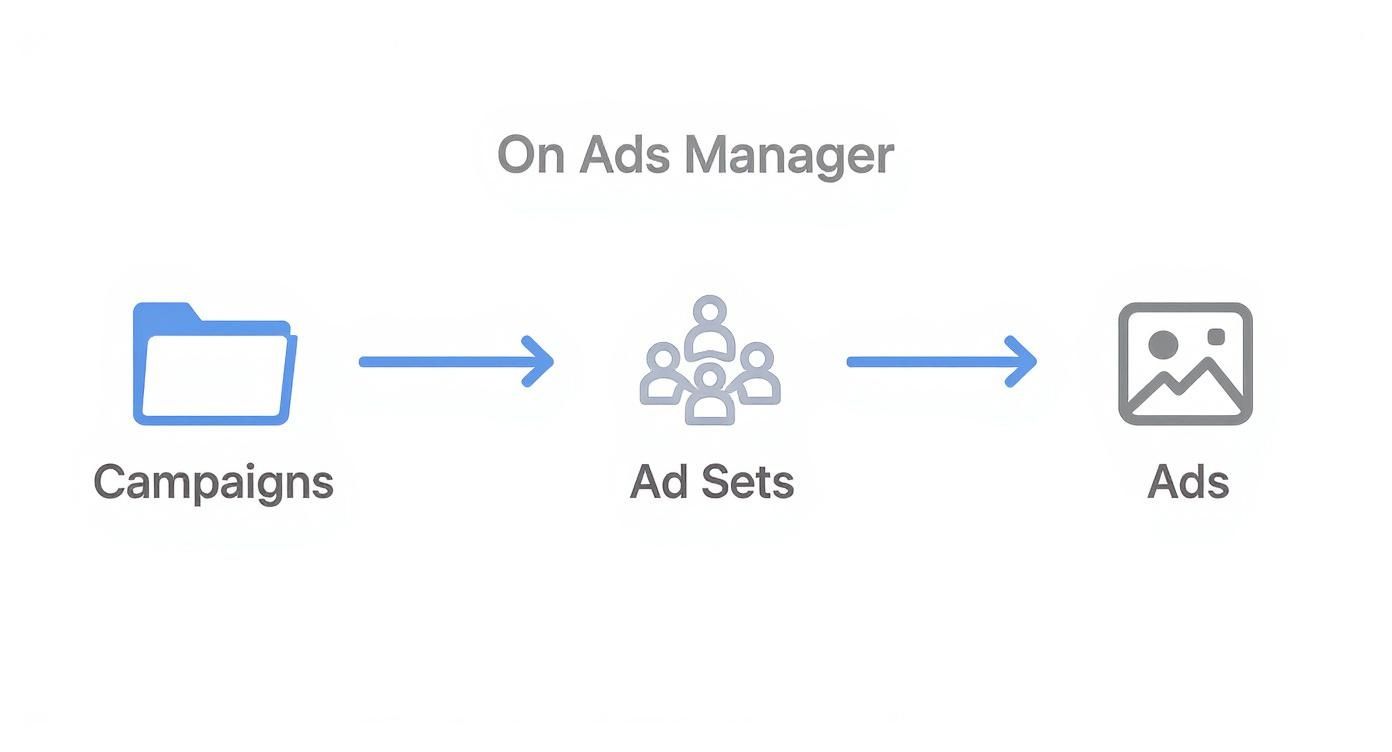
Think of it as a methodical way to test. One campaign can hold multiple ad sets, and each of those ad sets can contain a variety of ads.
Here’s a real-world example:
Let's say you have a "Summer Collection Launch" campaign. The objective you’ve chosen is Sales.
Inside that campaign, you might create two different Ad Sets:
Then, inside each of those ad sets, you could run five different Ads, testing various videos, images, and headlines against one another.
This structure lets you isolate the variables. You'll be able to see clearly whether your Lookalike Audience outperformed the interest-based one, and which specific image drove the most sales. Getting this right from the start is a foundational habit for anyone who's serious about scaling their ads effectively.
Having incredible creative is only half the battle. If you show it to the wrong people, you’re just lighting your ad budget on fire. The real magic of Meta's platform is its uncanny ability to pinpoint exactly who you're looking for. This is where we go beyond basic demographics and dive into the smart targeting that actually drives sales.
Your first layer is what Meta calls Core Audiences. This is your foundation, built from a mix of user-reported data, their interests, and what they actually do on the platform. Don’t just stop at age and location. You can get surprisingly specific, targeting users who’ve shown interest in 'sustainable fashion,' people who follow your direct competitors, or even those who engage with certain types of content.
While Core Audiences are solid for finding new people, the game completely changes when you bring your own data into the mix with Custom and Lookalike Audiences. Frankly, these are your most powerful assets.
Here’s the breakdown and how I use them:
Custom Audiences: Think of these as your "warm" leads—people who already know you. You can build these audiences from your website visitors (using the Meta Pixel), upload a customer email list, or target people who’ve liked a post on your Facebook or Instagram page. Simple and effective.
Lookalike Audiences: This is where things get really interesting. You give Meta a "source" audience, like a Custom Audience of your best customers. Its algorithm then scours the platform to find millions of new users who share similar traits and behaviors. It's the single best way to find new customers who act like your existing ones.
A killer strategy I use all the time is prospecting with Lookalike Audiences to fill the top of my funnel. Then, I use Custom Audiences to retarget anyone who visited the site but didn't buy, hitting them with a different ad or a special offer to nudge them over the finish line.
This one-two punch creates a constant flow of new prospects while making sure you're not letting warm leads go cold. If you want to go even deeper on this, you can learn more about finding your audience on Facebook and how to squeeze the most out of these tools.
Another key decision you'll make is where your ads show up. By default, Meta will push you towards Advantage+ placements. This setting lets the algorithm run wild, placing your ads across Facebook, Instagram, Messenger, and its Audience Network—wherever it thinks it'll get you the cheapest results.
For most advertisers, especially if you're just starting out, trusting the AI here is the right call. It’s pretty smart about finding cost-effective spots for your ads, which saves you a ton of guesswork.
But there are times when taking back control with manual placements is necessary. For example, if you’ve created a slick vertical video specifically for Instagram Reels, you don't want Meta trying to awkwardly cram it into a square feed placement. In that case, you’d manually select only Reels and Stories to make sure the ad looks exactly as intended. Never force a creative into a placement it wasn't designed for.
My advice? Start with Advantage+. Let your first campaigns run and gather data. See where you're getting the best results, and only then consider switching to manual placements if you have a strong, creative-driven reason to do so.
In the endless river of content that is a user's feed, your ad has less than a second to make someone care. This is where your creative—the combination of your visual, headline, and copy—does all the heavy lifting. You can have the most perfect audience targeting in the world, but it means nothing if your ad is invisible.
The secret to a high-performing ad isn't some crazy, complex formula; it's a simple exchange of value. You need to offer a solution, an insight, or an emotion that is more compelling than whatever they were about to look at next. Your ad copy has to speak directly to a pain point or a desire, creating an instant connection.
A truly great ad has three core components working in perfect harmony. If one is weak, the whole thing fails. Think of it as a three-legged stool—kick one leg out, and it all comes crashing down.
When you're crafting video ads, getting the technical specs right is just as important as the content. Knowing how to compress videos for social media is a must-have skill to maintain quality without slowing down load times. For a complete rundown on formats, check out our guide on Meta ad sizes.
Pro Tip: Your ad's primary text is crucial, but don't sleep on the "first three lines." On mobile, this is often all a user sees before clicking "see more." Lead with your most powerful hook to make those opening words count.
Making one great ad is an achievement. Making dozens of them consistently is a system. This is where so many marketers hit a wall, burning hours in Ads Manager manually uploading assets and recreating campaigns from scratch. This tedious work is a massive bottleneck that kills effective testing and scaling.
This is exactly where a tool like Lix.so becomes a game-changer. Instead of uploading creatives one by one, you can batch-ingest dozens of images or videos all at once.

The real magic happens when you combine this with reusable templates. You can turn a process that used to eat up an entire afternoon into something that takes just a few seconds.
By building out your winning campaign structures as templates, you can replicate them instantly. Found an ad formula that works? Just clone it, swap in a new batch of creatives, and launch a new test campaign in a few clicks. This kind of workflow efficiency is what separates marketers who are just "making ads" from those building a scalable, high-performing creative engine that constantly learns and improves.
Launching your campaign isn't the finish line; it's the starting gun. The real work begins once the data starts rolling in. This is where you switch from building to optimizing, turning raw numbers into smart, profit-driven decisions.
The first, and most important, step is to stop looking at every single metric available. It's a classic rookie mistake. Instead, laser-focus on the Key Performance Indicators (KPIs) that directly reflect your campaign's objective.
If you're an e-commerce store running a sales campaign, the only numbers that truly matter are Cost Per Purchase and Return on Ad Spend (ROAS). For a lead generation campaign, it's all about Cost Per Lead. Everything else is secondary.
This focused approach helps you avoid "analysis paralysis" and concentrate on what's actually moving the needle for your business.
To help you stay focused, here's a quick reference guide for which KPIs are most important based on what you're trying to achieve.
| Campaign Goal | Primary Metric | Secondary Metrics |
|---|---|---|
| Awareness | Reach, Ad Recall Lift | Impressions, Frequency, CPM |
| Traffic | Link Clicks, Landing Page Views | CPC (Cost Per Click), CTR (Click-Through Rate) |
| Engagement | Post Engagements, Page Likes | Cost Per Engagement, Engagement Rate |
| Leads | Leads, Cost Per Lead | Conversion Rate, Form Submissions |
| Sales | Purchases, ROAS | Cost Per Purchase, Add to Carts |
Think of this table as your cheat sheet. When you log into Ads Manager, you should be looking at the "Primary Metric" column first and foremost.
As data accumulates, certain patterns will emerge. Some are great, but others are clear signals that something needs to change. You have to learn how to spot these red flags early before they burn through your budget.
Here are a few common issues I always look for:
Understanding these relationships is the key to boosting your ROI. If you're using video, you can dive deeper into specific strategies for optimizing Facebook video ad conversions to really turn more of those views into sales.
You'll never achieve systematic improvement by guessing. You have to prove what works better with data. Luckily, the A/B testing feature baked into Ads Manager lets you scientifically test one variable at a time to find a clear winner.
My number one rule is to always be testing. Even when a campaign is crushing it, I’m running a test in the background—a new headline, a different image, a fresh audience segment—against my control. This continuous process of iteration is how you find small wins that compound into massive performance gains over time.
Start with simple tests, like pitting two completely different ad images against each other, and just let the data tell you which one your audience prefers. This simple habit transforms you from someone who just "runs ads" into a strategic marketer who builds profitable systems.
For a much deeper dive into monitoring your campaigns, our guide on Facebook Ads reporting offers a detailed look at building custom dashboards and tracking the metrics that actually matter.
No matter how many campaigns you’ve run, you’ll eventually hit a wall. An ad gets rejected for no clear reason, a payment fails, or a brand-new campaign refuses to spend a single cent. It happens to everyone.
This is your quick-and-dirty troubleshooting guide for the most common headaches in Facebook Ads Manager.
There’s nothing worse than hitting “Publish” on a killer ad, only to get that dreaded rejection notification. Don’t take it personally—Meta’s review process is mostly automated, and its bots are just looking for patterns that violate their ad policies.
More often than not, it’s one of these usual suspects:
If your ad gets rejected, just breathe. Read the reason they gave you, pull up the official ad policies, tweak your ad, and resubmit it.
A failed payment can grind your entire advertising operation to a halt. Luckily, the fix is usually simple. The first place to go is the "Billing & Payments" section in Ads Manager.
Nine times out of ten, the problem is an expired credit card or your bank flagging the charge as suspicious. The fastest solution is to update your payment method or add a backup card.
If your ad account gets disabled over a payment failure, your only priority is settling that balance. Once you’ve paid up, the account is usually back online in minutes. Keeping a backup payment method on file is the best way to prevent this from ever happening.
You launched the campaign, everything looks perfect, but the "Impressions" column is stuck at a big, fat zero. It’s maddening, but the cause is usually a simple oversight or a minor auction problem.
Before you panic, run through this quick checklist:
Stop wasting hours on manual campaign setup. With Lix.so, you can batch-upload hundreds of creatives and use reusable templates to launch perfectly structured campaigns in seconds, not hours. Cut the busywork and focus on what matters—strategy. Get started today at lix.so.
Create hundreds of Facebook Ads campaigns in minutes with Lix.so. Batch creative upload, reusable templates, and automatic campaign generation.
✓ Free for 14 days · ✓ No credit card required · ✓ Cancel anytime

