Published by December 16, 2025 · Reading time 21 minutes · Created by Lix.so
When you're creating video ads for Facebook, the single most important thing to remember is this: design for mobile first. The specific specs will change depending on where your ad shows up, but everything comes back to how it looks on a phone.
For those immersive, full-screen experiences like Stories and Reels, you absolutely need a 9:16 vertical aspect ratio. For the main Feed, a 4:5 or 1:1 ratio is your best bet to grab the most screen real estate as people scroll.
Getting a handle on the technical requirements for Facebook video ads is the first step in launching a campaign that actually works. While every ad placement has its own quirks, they all share one purpose: giving users a smooth viewing experience on the devices they use most. This is why you'll see different aspect ratios recommended for different spots.
Meta is pretty clear about this, recommending vertical formats like 9:16 for Reels and Stories and 4:5 or 1:1 for feed placements. This makes sense when you learn that roughly 60% of Facebook’s viewing time happens on mobile devices. Smart advertisers often end up making a few different versions of their creative to make sure it looks perfect everywhere.
To keep things simple, let's focus on the big three placements: Feed, Stories, and Reels. Each one is built for a different user mindset, from casual scrolling in the feed to full-screen, sound-on viewing in Reels. Sticking to these core specs will save you from common headaches like awkward cropping, blurry video, or your ad getting flat-out rejected.
This chart breaks down the main specs for these key placements.
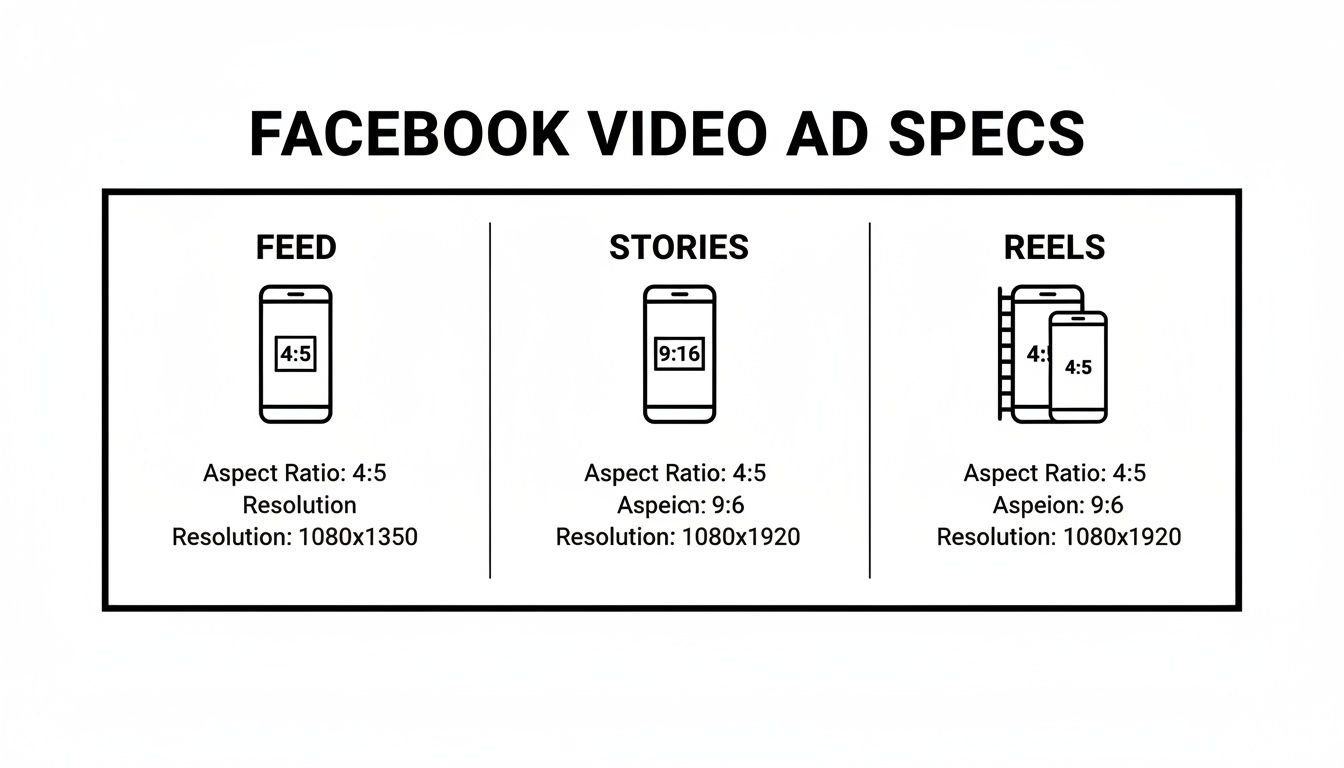
As you can see, there's a clear difference between the square or slightly vertical ads for the Feed and the tall, fully vertical 9:16 format that Stories and Reels demand.
Of course, knowing the specs is only half the battle. To see how these pieces fit into the bigger picture, it helps to understand how to create an advertisement on Facebook from start to finish. Mastering the technical details is the foundation, but applying them correctly in Ads Manager is what gets you results.
To make things even easier, here's a quick table summarizing the most important specs for the top Facebook video ad placements. It covers the essentials like aspect ratio, resolution, and maximum video length so you can find what you need at a glance.
| Placement | Aspect Ratio | Recommended Resolution | Max File Size | Max Duration |
|---|---|---|---|---|
| Feed | 4:5 or 1:1 | 1080x1350px or 1080x1080px |
4GB | 240 minutes |
| Stories | 9:16 | 1080x1920px |
4GB | 2 minutes |
| Reels | 9:16 | 1080x1920px |
4GB | 90 seconds |
Use this table as your go-to reference before you export your next video file. Getting these core specs right from the start will save you a ton of time and prevent frustrating upload errors down the line.

Let's get one thing straight: mastering Facebook video advertising specs isn't just about avoiding annoying upload errors. It's a strategic imperative that directly hits your campaign's bottom line. When your video fits its placement perfectly, it creates a seamless, native experience for the viewer. That's the first and most critical step to earning their attention.
Think about it from a user's perspective. A video that's awkwardly cropped or compressed into a blurry mess screams low effort and damages your brand's credibility in a split second. It's an instant invitation to keep scrolling. On the other hand, a crisp, perfectly formatted ad that fills the screen feels professional and engaging, massively boosting the odds that it gets watched. This isn't just about looking good; it's about performance.
Facebook's algorithm is built to reward advertisers who create a positive user experience. When your ads hit all the technical marks, they're primed to perform better in the ad auction from the get-go.
This creates a powerful feedback loop with tangible benefits:
Getting the specs right isn't just about technical compliance; it's about optimizing for the delivery system itself. A correctly formatted video prevents you from wasting ad spend on assets that the algorithm is already penalizing for poor quality.
Meta's pivot to video has been aggressive and undeniable, and its ad revenue tells the same story. Video content is king, with projections putting worldwide Facebook ad revenue at a staggering $116.53 billion in 2025.
Consider this: video now accounts for roughly 60% of time spent on the platform and drives over 50% of its ad revenue. For more details, check out these Facebook business statistics from ElectroIQ. Advertisers who don't just use video, but master its technical delivery, are the ones best positioned to capture a piece of this massive market.
Ultimately, ignoring these guidelines is like leaving money on the table. Every upload error, every cropped creative, and every pixelated video is a lost opportunity. By taking the time to nail the specs upfront, you’re setting your campaigns up for higher engagement, better delivery, and a much stronger return on your ad spend.
Getting the technical details right for each ad placement is non-negotiable. A video that absolutely crushes it in the Feed will fall flat—or get awkwardly cropped—in Reels. This is your definitive reference for the essential Facebook video advertising specs, broken down by the placements that matter most.
Think of it this way: every placement has its own user behavior. Some people are passively scrolling, others are leaned in for a full-screen experience. Matching your video's specs to the environment makes your ad feel native, not like a clumsy interruption.
The Feed is still the heart of Facebook and one of the most valuable spots for an ad. People are in a discovery mindset, scrolling through a mix of content from friends and brands. Your job is to grab their attention quickly while respecting that context. The key is thinking vertical.
And remember, most people watch Feed videos with the sound off. Your creative needs to work without audio, so use captions, bold text overlays, and strong visuals to tell your story from the very first frame. To get a complete picture, it's also worth checking the Instagram video length limits across placements to ensure consistency.
Reels and Stories are a completely different ballgame. They're fast-paced, immersive, full-screen experiences. The technical requirements are rigid for a reason: your ad has to look and feel like the native content surrounding it. Get the aspect ratio wrong here, and you'll end up with ugly black bars that scream "I'm an ad!"
The data backs this up. Meta's own research shows that vertical video with a voiceover can deliver 3–12% higher conversions. When you consider that the first three seconds of a video drive 47% of its total campaign value, it's clear that optimizing for these vertical formats isn't just a suggestion—it's critical for performance.
In-stream ads are your classic TV commercial-style spots. They appear before, during, or after videos from other creators and publishers. The viewer is already engaged and watching video content, so you have a captive audience, at least for a few moments.
Creative Tip: For in-stream, sound is usually on, which is a huge advantage. It's a great place for storytelling, but you have to hook the viewer in the first 5 seconds before that "Skip Ad" button appears.
The specs are a bit more flexible to fit different video players.
For a deeper dive into the specs across every single Meta placement, check out our comprehensive guide on Meta ad sizes.
Carousel and Collection ads are where you can really start to tell a story or showcase a range of products in a single, interactive unit. They're incredibly powerful for e-commerce brands because they pull users deeper into your catalog without making them leave the app.
Getting these multi-asset formats right is key. You're not just dealing with one video; you're building a small, interactive experience. Let's break down the specs for each.
Carousel ads are your go-to for showing off up to 10 videos or images, each with its own link, in a swipeable format. This is perfect for displaying different products, highlighting multiple features of a single item, or creating a step-by-step narrative.
The specs below apply to each individual video card in the carousel:
Think of each carousel card as a mini-ad that needs to work with the others. The specs are designed to make sure they all fit together seamlessly. Knowing the different types of Facebook ads helps you pinpoint exactly when a carousel is the right tool for the job.
Collection ads take things a step further, creating a mini-storefront right in the feed. They start with a primary "cover" video or image, sitting above a grid of four product images. When someone taps it, they open an Instant Experience—a fast-loading, full-screen mobile landing page.
The key to a great Collection ad is a cover video so captivating that users can't help but tap to see what's inside. That first video has to be perfect.
For that main cover video, here are the requirements:
Inside the Instant Experience, any product videos you feature should also follow the same 1:1 aspect ratio. This maintains that clean, grid-like feel, making your mobile storefront look professional and easy to browse, turning that initial tap into a potential sale.
While every ad placement has its own quirks, a handful of universal specs and creative principles apply to nearly all successful Facebook video ads. Getting these fundamentals right from the start is the key to avoiding common upload errors and performance headaches down the line.
Think of these as the foundation. Before you worry about the specifics of a Reel versus an In-Stream ad, make sure your core video file is built for success.
The first checkpoint is the file container. For maximum compatibility across Meta's entire ecosystem, stick to MP4 or MOV files. These formats hit the sweet spot between quality and file size, and using them will prevent that frustrating "Unsupported File Format" error before you even get started.
Inside that MP4 or MOV container, your video and audio streams need the right encoding. The industry-standard video codec, and the one Facebook prefers, is H.264. It's known for its incredible compression efficiency. For the audio track, always use AAC compression at 128kbps or higher to keep the sound crisp for anyone watching with audio on.
These settings are non-negotiable because they directly affect how your video survives Facebook's own compression algorithm. If you upload a high-quality source file, the platform has more data to work with, resulting in a much sharper final ad. This is often the simple reason why a video looks perfect on your computer but blurry or pixelated once it's live.
Getting your bitrate right is a crucial part of this. Bitrate controls the amount of data in your video stream—higher bitrates generally mean better quality but also create larger files. Finding the right balance is key.
To help you out, here are our battle-tested export settings that balance quality and file size perfectly for Facebook's platform.
| Resolution | Codec | Frame Rate (fps) | Recommended Video Bitrate (Mbps) | Recommended Audio Bitrate (kbps) |
|---|---|---|---|---|
| 4K (2160p) | H.264 | 24, 25, 30 | 35-45 | 128+ |
| 1440p (2K) | H.264 | 24, 25, 30, 48, 50, 60 | 16-24 | 128+ |
| 1080p | H.264 | 24, 25, 30, 48, 50, 60 | 8-10 | 128+ |
| 720p | H.264 | 24, 25, 30, 48, 50, 60 | 5-7.5 | 128+ |
Dialing in these settings during your export process will give your video the best possible chance of looking sharp and professional after it’s been uploaded and re-compressed by Meta.
Here's one of the most important creative rules: always assume your ad will be viewed without sound. A massive number of people scroll through their feeds in public, at work, or just prefer a silent browsing experience. If your entire message is locked away in a voiceover, you're invisible to most of your audience.
Your story must work visually first.
Remember, captions aren't just an accessibility feature anymore. On social media, they are a primary tool for engagement in a sound-off environment. An ad that's confusing without audio is an ad that will be scrolled past.
Before you hit "publish," do a quick final check. This simple routine can save you hours of troubleshooting and make sure your campaign launches without a hitch.
By building your export workflow around these universal rules, you create a reliable foundation for every video ad you make. It frees you up to worry less about technical gremlins and more about creative strategy.
Sooner or later, every advertiser hits an upload error. It's frustrating, but these issues almost always boil down to a simple mismatch between your video file and the required facebook video advertising specs for that specific ad placement. This guide will help you quickly figure out what's wrong and fix it.
Don't just guess what the problem is. An error message from Facebook is your best starting point, often telling you exactly which spec to adjust—be it the file format, resolution, or something else. Most of the time, the fix is just a quick re-export away.
This is probably the most common error you'll see, but thankfully, it's also the easiest to solve. If you get a "file format not supported" message, it just means your video isn't saved in a container that Facebook's system can read.
Does your video look weirdly cropped, stretched out, or just plain blurry? These visual glitches are a dead giveaway that your aspect ratio or resolution settings are off.
An aspect ratio mismatch is the #1 reason your ad's creative gets butchered. If you force a 16:9 widescreen video into a 9:16 Stories slot, the platform will chop off the sides, likely cutting off key parts of your message and tanking your ad's performance.
Here’s how to get it right:
For advertisers juggling tons of video assets across different campaigns, manually checking every single file is a massive time-sink. This is where using a specialized tool can prevent these errors from ever happening. You can learn more about how to streamline this process in our Facebook ads bulk video uploader guide, which shows how automation can ensure every single asset is perfectly spec-compliant before it even touches Ads Manager.
Even with a detailed spec sheet, you’re bound to run into a few head-scratchers. Some questions about Facebook video advertising specs just keep popping up. This section is your go-to for quick, direct answers to the most common issues advertisers face, helping you solve problems on the fly and get your campaigns live.
Think of this as the quick-lookup cheat sheet for those nagging technical questions that can throw a wrench in an otherwise smooth ad launch.
The short answer: MP4. While Meta also supports MOV files, MP4 consistently delivers the best blend of quality, compression, and universal compatibility across every single one of their platforms and devices. It just works.
To be more specific, your MP4 file should ideally be packaged with:
Sticking to this MP4 (H.264/AAC) combo is the most reliable way to dodge those frustrating "Unsupported File Format" errors and make sure your ad looks and sounds crisp everywhere it appears.
If your video looks blurry or pixelated after you upload it, the culprit is almost always double compression. Here’s what happens: you compress the video once when exporting from your editing software. Then, Facebook compresses it again to optimize it for delivery. If your initial export is already low quality, Facebook’s algorithm has very little data to work with, resulting in a blurry mess.
The fix lies entirely in your export settings.
Pro Tip: Always upload the highest quality video file you can, as long as it stays under the 4GB size limit. Giving Facebook’s compression algorithm a higher source bitrate to work with preserves much more detail, leading to a visibly sharper final ad.
Start with a high-resolution source file (like 1080p or even 4K) and use a generous video bitrate. You can reference our recommended compression settings table in the previous section to find the sweet spot for your video's resolution. This one step makes a massive difference in visual clarity.
This is a common point of confusion because the answer changes dramatically depending on the placement. For instance, a standard Facebook Feed video ad can technically run for up to 240 minutes, while a Reels ad is capped at a much shorter 90 seconds.
But the real question isn't how long an ad can be, but how long it should be. All the data points to shorter, punchier videos performing better. For most placements, aiming for under 60 seconds is a solid strategy, and many of the top-performing ads get the job done in under 15 seconds. The key is to grab attention and deliver your core message within the first few seconds, no matter what the placement's maximum allowed length is.
Ready to stop wasting hours on manual campaign builds and creative uploads? Lix.so automates the entire process. Use our batch ingestion and reusable templates to launch perfectly formatted Facebook ad campaigns in seconds, not hours. See how much time you can save by starting your free trial at https://lix.so/en.
Create hundreds of Facebook Ads campaigns in minutes with Lix.so. Batch creative upload, reusable templates, and automatic campaign generation.
✓ Free for 14 days · ✓ No credit card required · ✓ Cancel anytime

