Published by December 21, 2025 · Reading time 19 minutes · Created by Lix.so
We've all been there. You pour hours into crafting the perfect Facebook ad campaign, hit "Publish," and then... nothing. Zero impressions. It’s a gut-wrenching feeling every marketer knows.
Before you start tearing apart your audience targeting or second-guessing your creative, take a breath. The fix is often much simpler than you think. More often than not, the problem isn't your strategy—it's a simple oversight in the setup.
Think of this as campaign triage. Your first move should always be a quick scan for the most common, easily fixed culprits that stop an ad dead in its tracks.
I can't tell you how many times I've seen advertisers jump straight to complex diagnostics when the real issue was a campaign scheduled to start next week or an ad set that was accidentally left paused. It's a classic rookie mistake that wastes time and clouds your judgment.
Start with a disciplined approach. Run through the fundamentals before you touch anything else.
Here’s what you need to check first, right inside Ads Manager:
This quick checklist below is your first line of defense. Run through these three areas before you dive any deeper into the troubleshooting process.
| Area to Check | Potential Problem | Immediate Action |
|---|---|---|
| Status Toggles | Campaign, Ad Set, or Ad is paused. | Navigate to the correct level and toggle the switch to Active. |
| Billing Section | Payment method failed or expired. | Go to your account's Billing & Payments section and update your card details. |
| Ad Set Schedule | Start date is in the future or end date has passed. | Edit the ad set and adjust the Schedule to the correct dates. |
Mastering these basic checks will solve a surprising number of delivery headaches without any unnecessary stress.
This decision tree illustrates the exact first two questions you should ask: is the ad's status "Active," and is there a billing issue?
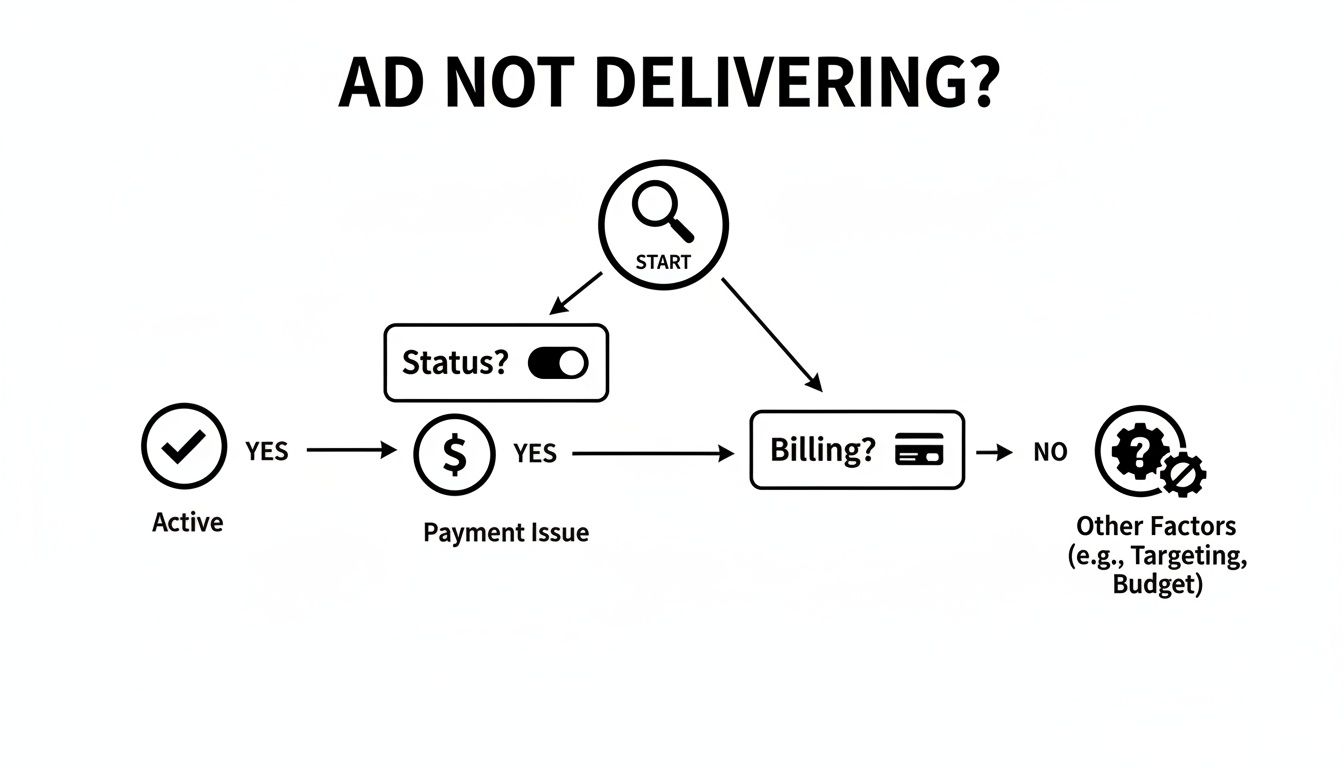
As the flowchart shows, technical and administrative issues are always the first checkpoints, long before you start analyzing performance or strategy.
If you’ve gone through these initial steps and everything looks correct, the next logical step is to investigate potential policy violations. An ad flagged for a policy issue or a low-quality landing page can get stuck in review or receive zero delivery until you fix it.
Getting these fundamentals right is crucial. You can get more familiar with the platform's layout and features in our complete Facebook Ads Manager tutorial.
If you've checked the basics and everything looks good, it's time to investigate the next most likely culprit: Meta's ad policies. An ad rejection is one of the most common reasons a campaign gets stuck at zero impressions, and frankly, the automated review system can be ruthless. It often flags ads for reasons that aren't immediately obvious.
You have to remember, Meta’s primary goal is protecting the user experience. That means its review bots are constantly on patrol, scanning for anything that might be misleading, sensitive, or just plain low-quality. This scrutiny applies to everything from the words in your ad copy to the design of your landing page.

Even the most well-intentioned ads can get caught in the policy crossfire. From my experience, here are a few of the most frequent offenders:
Pro Tip: Don't just skim the ad policies—read the ones specific to your industry. The rules for an e-commerce store selling t-shirts are worlds apart from those for a financial services firm. Misunderstanding these nuances is a fast track to zero delivery.
When you're dealing with a rejection, your best friend is the Account Quality dashboard. Think of it as your direct line to Meta’s policy team. It’s where they tell you exactly what went wrong and why.
You can get there through your Ads Manager, and it provides a clear breakdown of which ads were rejected and the specific policy they violated. This takes the guesswork out of the equation and lets you take targeted action.
Once you’ve identified the problem, you have two main paths forward.
The first, and most common, is to simply edit the ad to bring it into compliance. This could mean tweaking your copy, swapping out an image, or fixing something on your landing page. Once you've made the changes, you can resubmit it for a new review.
Your second option is to request another review if you genuinely believe the rejection was a mistake. Let's be real, the automated system gets it wrong sometimes, and a manual review by a human can often overturn the decision. But—and this is a big but—only use this option if you are 100% confident your ad is compliant. Repeatedly asking for reviews on non-compliant ads is a good way to get further restrictions slapped on your account.
If you clear the policy hurdle but your ad is still stuck on the launchpad, it’s time to dig into your audience and budget settings.
So, your ad sailed through the policy review, but it's still sitting there with zero impressions. What gives?
Nine times out of ten, when an approved ad isn't delivering, the problem isn’t a technical glitch—it's strategic. Your audience and budget settings are the engine of your campaign. Get them wrong, and everything grinds to a halt. An approved ad is worthless if the algorithm has nobody to show it to, and this happens way more often than you'd think.
One of the most common delivery killers is an audience that’s just too small. It's tempting to get hyper-specific with targeting, but layering on dozens of interests, behaviors, and demographic filters can shrink your potential reach until Facebook’s algorithm simply gives up.
For instance, targeting "women aged 25-27, in a single zip code, who are interested in both yoga and rock climbing" feels incredibly precise. But you might be left with an audience of only a few thousand people. For Facebook's auction system, that's not enough runway to find users likely to convert, so it might not even bother showing your ad.
Your goal is to give the algorithm room to breathe. Aim for audiences broad enough for optimization but still dialed-in to your ideal customer.
Key Takeaway: An overly restrictive audience is a classic delivery blocker. If your potential reach dips below 50,000 people, you're likely strangling the algorithm's ability to learn and find placements. Delivery can stall before it ever gets a chance to start.
It's also possible you're dealing with audience exhaustion. If you've been hammering the same small custom audience for weeks, you've probably hit this wall. Check your frequency scores—if they're sky-high, it's a dead giveaway. Once everyone has seen your ad multiple times, engagement plummets, and the algorithm stops prioritizing you, causing delivery to drop off a cliff.
Fresh audiences are vital for long-term campaign health. If you're stuck, our guide on how to use Audience Insights on Facebook can help you uncover new segments.
Another sneaky issue is auction overlap. This is when you have multiple ad sets targeting similar or identical audiences. Instead of competing with other advertisers, you're actually bidding against yourself. Facebook's system will typically only show one "winning" ad from your account to any given user, meaning your other ad sets get left in the dust and fail to deliver.
Thankfully, Meta gives you a tool for this. Dive into the "Audience Overlap" tool to see just how much your audiences are stepping on each other's toes.
Finally, the simplest answer might be the right one: your budget is the bottleneck. If your daily spend is too low for your bid strategy or the cost of your desired action, your ad just won't be competitive. A $5 daily budget for a "Purchase" optimization event in a crowded market is almost never enough to get out of the learning phase, which will cause your delivery to sputter and die.
Okay, so you’ve confirmed your ads are approved, your audience isn't a ghost town, and your budget is set. If your campaign is still dead in the water, it’s time to pop the hood and look at the engine: your bidding strategy and optimization goal.
The Facebook ad auction is a ruthless, real-time marketplace. Your bid is what gets you in the game. If it's set too low or your optimization goal is out of sync with reality, the algorithm will simply sideline you. Your ad won’t just perform poorly; it won’t deliver at all.
Think of it like this: millions of advertisers are all clamoring to reach the same people. Meta’s algorithm has the tough job of picking the ad that offers the most value to both the user and the advertiser. When you set a super restrictive bid, like a very low cost cap, you're essentially telling Meta, "I'll only pay this tiny amount. Take it or leave it." In a competitive auction, the algorithm will almost always leave it.

This leads us to one of the most common—and most misunderstood—reasons for delivery failure: data starvation.
Meta's algorithm is a learning machine. To learn, it needs a steady diet of conversion data. A classic reason advertisers find their Facebook ads "not delivering" is that they aren't feeding the machine enough data. The industry benchmark is that the algorithm needs roughly 50 conversion events per week per ad set to properly learn and optimize for purchases. If you can't hit that threshold, delivery will often grind to a halt.
Imagine launching a brand-new campaign for a high-ticket product. You eagerly set your optimization goal to "Purchase." But with a small starting budget, you might go days without a single sale. From the algorithm's point of view, your ad is a total dud. It's getting zero positive signals, so it cuts delivery and gives impressions to ads that are actually generating data.
This is a textbook case of aiming too far down the funnel, too soon. Your campaign gets stuck in the dreaded "Learning Limited" phase, which is basically purgatory before it flatlines completely.
The fix is surprisingly simple: give the algorithm an easier win. Instead of demanding buyers right out of the gate, ask it to find people who just show some initial interest. This smart pivot feeds the algorithm the data it desperately needs to build momentum.
Here’s a practical way to think about it:
Top of Funnel (For New Campaigns): If you're starting from scratch with a cold audience, don't go for Purchases. Optimize for a higher-funnel event that happens more often.
Middle of Funnel (When You Have Some Data): Once you're getting consistent traffic, you can start moving down the funnel.
Key Takeaway: If your "Purchase" optimized ad isn't delivering, try switching the optimization event to "Add to Cart" or "Landing Page Views" for a week. This "warms up" the algorithm with more frequent data points, which can be the kickstart it needs to get moving. You can always switch back to Purchase optimization later once you have more data.
By aligning your optimization goal with your campaign’s maturity, you start working with the algorithm instead of fighting it. For more advanced strategies on getting the most out of your campaigns, check out our in-depth guide to optimising Facebook ads. It’s a simple change that ensures your ad has the best possible shot at competing in the auction and finally reaching your audience.
Look, the best way to fix a Facebook ad that isn't delivering is to build it so it never fails in the first place. While knowing how to troubleshoot is a critical skill for any media buyer, a proactive approach saves an incredible amount of time, money, and sanity.
This is about shifting your mindset from being a firefighter to being an architect. You want to design campaigns with solid foundations, making delivery issues a rare exception, not a daily headache. It all starts with a clean, logical ad account structure and a disciplined process for creative testing. Stale creative is a notorious delivery killer; having a system to cycle in fresh ads keeps your campaigns healthy and signals relevance to Meta’s algorithm.
Before you even think about launching, two technical pieces are absolutely non-negotiable for stable delivery: the Meta Pixel and the Conversions API (CAPI).
These are the data pipelines that feed the algorithm. If they're broken or missing, the algorithm is flying blind. It has no idea who's converting on your site, so it can't find more people like them. This almost always leads to delivery stalling out.
Think of it like this: the Pixel is your scout on the ground, and CAPI is the satellite feed. You need both to get the full picture, especially with all the browser tracking limitations these days.
Here’s why they are so vital:
A poorly installed Pixel or a missing CAPI setup is one of the most common reasons campaigns get stuck in "Learning Limited" and eventually stop delivering altogether. You're essentially starving the algorithm of the information it needs to do its job.
Your budgeting strategy also plays a huge role in preventing delivery problems. Instead of manually setting budgets for every single ad set and micromanaging them, let Advantage Campaign Budget (what we used to call CBO) do the work for you.
When you turn on Advantage Campaign Budget, you're giving Meta the flexibility to automatically shift your spend to the ad sets and ads that are performing best in real-time. It’s a simple but powerful way to prevent one underperforming ad set from trapping budget while a potential winner starves for funds.
Imagine you have three ad sets. Without CBO, if Ad Set A stalls, its budget just sits there, wasted. But with CBO, Meta would instantly reallocate that unused cash to Ad Sets B and C, ensuring your money is always being put to the best possible use. This dynamic allocation is a game-changer for maintaining delivery momentum.
By focusing on these foundational pillars—a solid account structure, proper technical tracking, and smart budgeting—you build campaigns that are simply far more resilient and much less likely to give you that dreaded "ad not delivering" notification.
Even when you’ve ticked every box and followed all the best practices, sometimes an ad just… sits there. No impressions, no delivery, just a big fat zero. You’ve double-checked the payment method, confirmed the ad is active, and stared at your audience settings until your eyes glazed over.
Let's dive into a couple of the most common—and frustrating—questions that pop up when an ad refuses to deliver.
Meta’s official line is that most ads are reviewed within 24 hours. In the real world? It's not that simple. Think of that 24-hour window as a guideline, not a guarantee.
Several things can slow it down. If you’re running ads in a "Special Ad Category" (like housing or credit), or if you’re advertising from a brand new ad account, you can bet Meta's team is going to take a closer look. That means a longer review. Big shopping holidays like Black Friday also create a massive backlog for everyone.
If you’ve been stuck in review for over 48 hours, it’s time to start looking for answers. Your first stop should always be the Account Quality dashboard to see if there are any flags you missed.
Whatever you do, don't edit an ad while it's "In Review." I’ve seen so many marketers make this mistake. Any change, no matter how small, resets the review timer and pushes your ad straight to the back of the line. Just be patient and let the initial review finish.
Seeing that dreaded "Learning Limited" status is a huge red flag. It’s Meta’s algorithm telling you it doesn’t have enough data to do its job.
Specifically, it means your ad set isn't getting enough optimization events—the magic number is typically 50 conversions per week—to figure out who it should show your ad to.
This status is a direct threat to your ad's delivery. The algorithm can't learn, so it gets conservative and throttles your ad's reach, eventually grinding it to a complete halt. It's basically saying, "I'm lost. I can't find the right people for you, so I'm giving up."
To fix it, you need to give the algorithm more signals to work with. Try one of these:
Ignoring "Learning Limited" is a one-way ticket to zero impressions. Take it seriously and give the algorithm the data it needs to start delivering your ad effectively.
Tired of ads getting stuck because of simple build errors? Lix.so is built to eliminate the manual, mistake-prone process of creating campaigns. Launch flawless ads in seconds using templates and batch uploads, so you can focus on strategy, not troubleshooting. Give our free trial a spin.
Create hundreds of Facebook Ads campaigns in minutes with Lix.so. Batch creative upload, reusable templates, and automatic campaign generation.
✓ Free for 14 days · ✓ No credit card required · ✓ Cancel anytime

