Published by December 8, 2025 · Reading time 26 minutes · Created by Lix.so
Optimizing Facebook ads isn't just about tweaking a few settings. It’s about building a repeatable, data-driven system to audit your account, test creatives like a machine, and refine your audiences until you’re consistently hitting your ROAS or CPA targets. It’s the shift from guesswork to a process that tells you exactly where your next dollar should go. This first diagnostic step is honestly the most important part of the whole game.
Before you even think about launching a new creative or playing with bidding strategies, you have to do an audit. So many advertisers skip this and jump straight into testing. That's like trying to find your way in a new city without a map—you'll definitely move around, but you'll have no idea if you're getting closer to your destination.
A solid audit gives you a baseline. It helps you spot the quick wins, find the glaring holes in your strategy, and gives you a real "why" behind every change you make from here on out. If you skip this, you’re just making blind adjustments that can reset the algorithm’s learning and actually hurt your performance.
The goal here is simple: get a quick snapshot of your account's vital signs. The first thing I always look at is the structure. Are your campaigns organized in a way that makes sense? A common setup is splitting them by objective, like Prospecting, Retargeting, and Retention. A messy, chaotic structure makes it almost impossible to manage budgets or figure out what’s really going on when performance dips.
Next, you need to dive into the numbers from the last 30 to 90 days. Don't just glance at the top-level metrics; the real story is always hidden in the segments.
Here are the big four I always check:
A rookie mistake is getting stuck on campaign-level data. The gold is in the breakdowns. Segment your performance by placement, device, or even age group to see precisely which pockets are driving results and which are just eating your budget.
Ad fatigue is going to happen. It's inevitable. The trick is to get ahead of it.
Go into your Ads Manager, sort your ads by impressions, and look for the ones with the highest frequency and a dropping CTR. Found them? These are the first ads you need to refresh or replace. This simple check-up is the heart of ongoing optimization.
To truly build a solid framework, it's worth digging deeper into how to optimize Facebook Ads for better results. This initial audit provides the essential context you need before moving on to testing and scaling.
This groundwork is non-negotiable, especially when you consider the scale you're playing with. Facebook's advertising reach hit around 2.28 billion users globally as of January 2025—that's a 4.3% jump from the previous year. With an audience that massive, a data-driven approach is the only way to avoid burning cash and actually connect with the people who will buy from you.
Here's a quick checklist to guide you through your initial audit, focusing on the easiest things to spot and fix.
This table breaks down the key areas to review in your account for immediate improvement opportunities.
| Audit Area | What to Look For | Actionable Insight |
|---|---|---|
| Campaign Structure | Disorganized or overlapping campaigns and ad sets. | Consolidate similar audiences and simplify your structure (e.g., Prospecting, Retargeting). |
| Performance Metrics | Declining ROAS or CTR; rising CPA or Frequency. | Identify the specific ads or ad sets causing the dip and pause or refresh them immediately. |
| Audience Overlap | Multiple ad sets targeting similar user segments. | Use Facebook's Audience Overlap tool. Consolidate ad sets to prevent bidding against yourself. |
| Placement Performance | High spend on low-performing placements (e.g., Audience Network). | Exclude placements that are spending money without converting, or move to Advantage+ Placements. |
| Creative Fatigue | High frequency (>3-4) and a CTR that has dropped over time. | These ads are burned out. Swap them with fresh creative variations immediately. |
Running through this checklist should only take about 30 minutes, but the insights you gain will set the stage for every successful optimization you make from this point forward.
Once you've audited your account, it's time to pull the most important lever you have for optimizing Facebook ads: your creative. Let’s be honest, while targeting and bidding are important, it's the ad itself—the visual and the message—that actually stops the scroll and gets someone to act.
For any kind of lasting success, a structured, repeatable creative testing workflow isn't just nice to have; it's non-negotiable.
This isn't about A/B testing a button color. It’s about methodically testing the core pieces of your ad—the hook, the angle, the format, and the call-to-action—to find winning formulas you can pour more budget into.
Great testing always starts with a clear hypothesis. Don't just throw random images and headlines at the wall to see what sticks. You need an educated guess about why something will work for your audience. A solid hypothesis is specific, measurable, and gives your test a purpose.
For instance, a weak hypothesis is something like: "Let's see if a video ad works better." It's vague and gives you nothing to measure against.
A much stronger hypothesis would be: "We believe a user-generated content (UGC) style video showing our product in a real-life setting will get a 20% lower Cost Per Purchase than our current studio-shot photos. This is because we think it builds more trust and feels more relatable to our audience."
See the difference? Now you have a clear success metric. You should focus your hypotheses on a few key areas:
To get results you can actually trust, you have to isolate what you're testing. If you launch an ad with a new image, a new headline, and new body copy all at once, you’ll have no clue which element actually moved the needle.
The two best ways to structure your tests are with Dynamic Creative or by using separate ad sets.
Dynamic Creative Optimization (DCO) is brilliant for testing multiple components at the same time. You can give Meta a handful of images or videos, a few headlines, and some primary text options. Its algorithm will then mix and match everything to find the best-performing combinations for you. It's incredibly efficient for initial discovery.
Separate Ad Sets give you more direct control. Here, you create identical ad sets where only one thing is different. For example, Ad Set 1 targets Audience A with Creative 1, and Ad Set 2 targets the exact same Audience A but with Creative 2. This is the cleanest way to run a true head-to-head comparison, especially when testing completely different concepts.
Don't be impatient and kill a test too early. You need to let it run long enough to gather at least 50 conversion events and exit the learning phase. Making a call based on a few hundred impressions is a surefire way to kill a potential winner.
The biggest bottleneck in creative testing isn't coming up with ideas—it's the sheer amount of time it takes to build and launch all the variations in Ads Manager. Manually creating dozens of ads is a slow, tedious process that's just begging for human error.
This is exactly where a tool like Lix.so becomes a game-changer for optimizing Facebook ads.
Imagine you have a static ad that's performing well. Instead of booking a video shoot or spending hours in an editing suite, you can use a tool to instantly generate multiple video variations from that single image. Suddenly, you can test different animations, text overlays, and music in just a few minutes.
The process of auditing your ads becomes a seamless flow, focusing on structure, metrics, and creative.
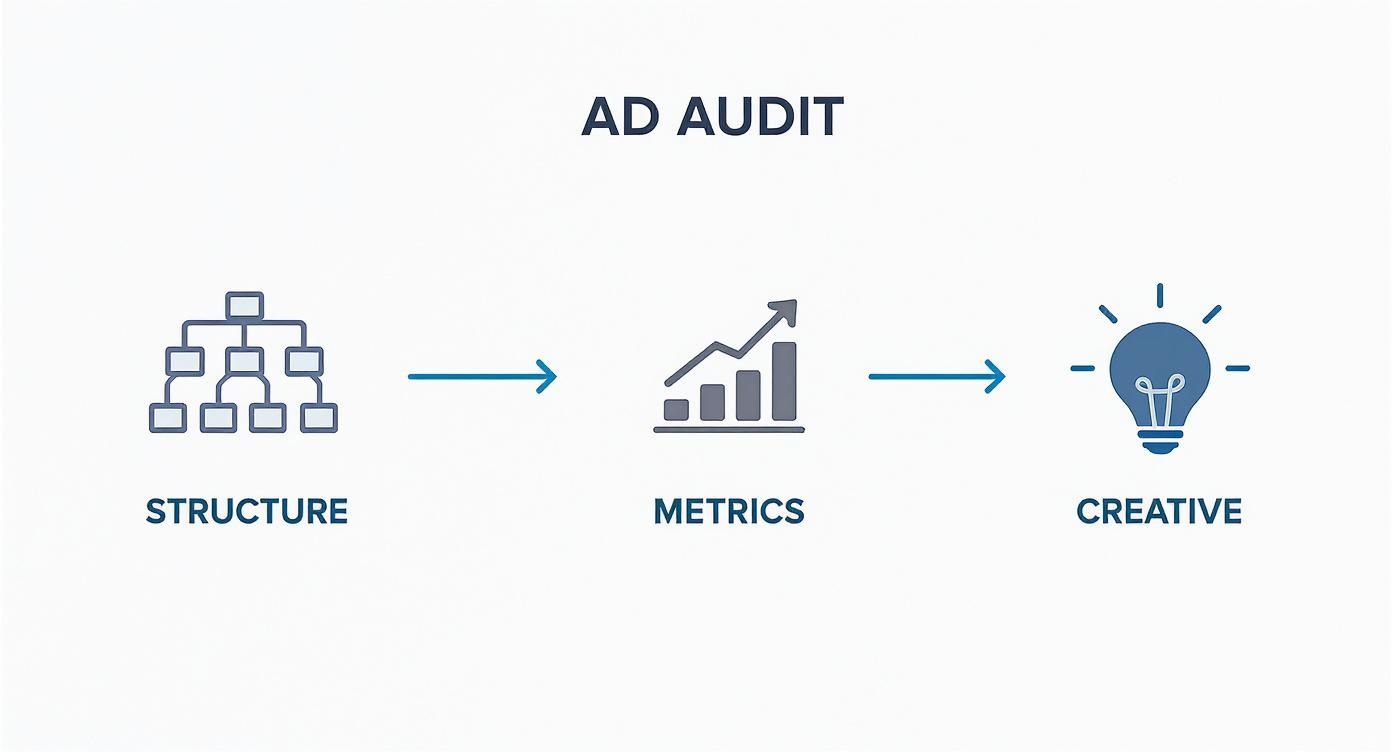
This workflow shows how looking at your account structure and metrics should directly tell you which creatives need to be tested or iterated on next.
With a tool like Lix.so, you can upload all these new video variations in a single batch, apply a pre-built campaign template, and launch the entire test in seconds. This kind of speed completely transforms your testing capacity, letting you learn and adapt way faster than competitors stuck doing everything by hand.
It closes the loop between having an insight and taking action, making continuous improvement an actual reality. And to make sure every creative is set up for success, check out our guide on video ad specifications for Facebook.
Great creative is worthless if it never reaches the right people. This is where the other half of the Facebook ads puzzle clicks into place: surgically precise audience targeting paired with smart budget management. Simply layering a few interests together doesn't cut it anymore. Real success comes from a much deeper approach to who you're talking to and how you're spending to reach them.
The bedrock of any solid audience strategy is your own first-party data. This is the goldmine you're already sitting on—your email list, past customer data, and website visitor information. Meta’s algorithm is incredibly powerful, but you have to give it a high-quality starting point to work its magic.
This data is what lets you build powerful Custom Audiences for retargeting. More importantly, it allows you to create high-quality Lookalike Audiences for prospecting. A Lookalike Audience built from your top 5% of customers by lifetime value will almost always blow a generic "all email subscribers" Lookalike out of the water.
One of the biggest questions for media buyers today is when to let the algorithm take the wheel versus when to grab it yourself. This choice directly impacts both your audience and your budget.
Advantage+ Campaigns: Think of these as Meta's AI-powered autopilot. They automate targeting and placements, and they are fantastic when you have a proven product, strong creative, and a well-seasoned pixel with lots of conversion data. They excel at scaling broadly and finding new pockets of customers you might have missed entirely.
Manual Campaigns: This is where you get granular. You choose the specific audiences, placements, and bidding strategy. A manual setup is essential for testing a specific hypothesis, zeroing in on a niche audience, or when you need to carefully control how your budget is split between prospecting and retargeting.
A common mistake is going all-in on one or the other. The best approach is often a hybrid. Let a broad Advantage+ campaign run as your always-on workhorse, driving consistent performance. Alongside it, run manual campaigns to test new angles, target very specific high-value segments, or remarket to warm audiences with custom-tailored messaging.
Don't fight the machine, feed it. The better the data you provide—whether through your pixel or high-quality customer lists for Lookalikes—the more effectively Advantage+ can find your ideal customers at scale.
To get the most out of these strategies, you need to understand the data you're collecting. Our guide on using Audience Insights on Facebook can provide deeper context on how to analyse the people you're reaching.
How you split up your budget is just as critical as how much you spend. The two main ways to do this are at the campaign level or the ad set level.
Campaign Budget Optimization (CBO), now called Advantage Campaign Budget, is Meta's default for a reason. With CBO, you set one central budget for the whole campaign, and Meta’s algorithm automatically shifts spend to the best-performing ad sets in real time. It's incredibly efficient and stops you from constantly second-guessing and manually moving money around.
But that doesn't mean Ad Set Budgets (ABO) are obsolete. Far from it. ABO is perfect for testing. When you absolutely need to guarantee a specific amount of spend on a new audience or a creative test, setting the budget at the ad set level ensures it gets a fair shot and doesn't get starved of funds by a proven winner in a CBO campaign.
Here’s a practical framework for your budget strategy:
Great creative and sharp targeting will get your ads in front of the right eyeballs, but that’s only half the battle. Your bidding and delivery settings are the instructions you give Meta’s algorithm on how to spend your money to hit your goals. Optimizing your ads isn't just about what you show and to whom; it's about making the machine work smarter for you. Honestly, this is where a lot of advertisers miss out on a massive competitive edge.
Think of the algorithm as your most talented (but very literal) employee. To get the best work out of it, you need to provide a crystal-clear objective. Your bidding strategy is that core instruction—it defines exactly what a "win" looks like for your campaign.
Meta gives you a few different ways to bid, and your choice should hinge entirely on your campaign’s objective and how much you can tolerate cost swings. Get this part wrong, and you're looking at either unpredictable spending or a lot of missed opportunities.
Let’s break down the main strategies you’ll be working with. Each one tells the algorithm to prioritize a different outcome.
Highest Volume (Lowest Cost): This is the default setting for a reason. You’re telling Meta, "Get me the most purchases (or leads, or whatever) you can for my budget." It’s fantastic for maximizing sheer conversion volume when you aren’t handcuffed to a super-strict cost-per-result.
Cost Per Result Goal: Here, you get more control. You set an average cost you’re willing to pay per result, and Meta’s algorithm will aim to hit that average. Some conversions will cost more, some less, but it tries to balance out to your target CPA. This is your go-to when profitability depends on a specific number.
ROAS Goal: For my fellow e-commerce folks, this one is gold. You set a minimum Return On Ad Spend (e.g., 2x or 200%), and Meta will hunt for users most likely to spend enough to meet that goal. It’s about value, not just volume.
A classic mistake I see all the time is setting cost caps or ROAS goals that are completely unrealistic. If you tell Meta you only want to pay $5 for a purchase when the auction is clearing at $25, your ads will barely see the light of day. You're essentially strangling your campaign before it even has a chance to breathe.
So which do you pick? If you just need to spend your budget and get as many conversions as the market will give you, Highest Volume is a reliable place to start. If your business model lives or dies by a specific CPA, the Cost Per Result Goal is the control you need. And if your primary focus is driving profitable revenue, the ROAS Goal aligns your ad spend perfectly with your bottom line.
To help you decide at a glance, here’s a quick comparison of how these strategies stack up.
This table provides a simple overview to help you match the right bidding strategy to your campaign's primary objective.
| Bidding Strategy | Best For | Key Consideration |
|---|---|---|
| Highest Volume | Maximizing the number of conversions and spending the full budget. | Can lead to fluctuating CPAs. Best when you don't have a strict cost target. |
| Cost Per Result Goal | Maintaining a specific average cost per action (CPA) for profitability. | Setting the goal too low will severely limit ad delivery and scale. |
| ROAS Goal | E-commerce campaigns focused on achieving a minimum return on ad spend. | Requires accurate conversion value tracking. Less focus on volume, more on value. |
Ultimately, your choice here should be a direct reflection of your business economics. Don't just pick one because it sounds good; pick the one that aligns with what actually makes you money.
Beyond the core bid strategy, a few other levers control how and where your ads show up. These settings can have a surprisingly big impact on your campaign's efficiency.
The most important one is placement selection.
Advantage+ Placements: This is Meta's default, and for good reason. It lets the algorithm automatically show your ads across the entire network (Facebook Feed, Instagram Stories, Reels, Audience Network, etc.) wherever it predicts the best results. For most advertisers, most of the time, this is the way to go. Trust the machine.
Manual Placements: This puts you in the driver's seat, allowing you to pick and choose exactly where your ads appear. You might use this if you have solid data showing a specific placement—like Instagram Reels—crushes it for a certain type of video creative. Use this for surgical precision, not as your default.
Another handy tweak is ad scheduling. This lets you run ads only on certain days or at specific times. For a local restaurant promoting a lunch special, running ads only from 10 AM to 2 PM on weekdays makes perfect sense. But for most e-commerce brands, it’s usually better to run ads 24/7. You never know when someone will be scrolling at 2 AM and decide to buy.
By making these strategic adjustments, you’re working with the algorithm, not against it. That collaboration is the key to advanced optimization—it helps Meta find your best customers faster and at a price that keeps your business healthy.
Let's be honest: you can have the most magnetic creative and a perfectly dialed-in audience, but if you can't trust your data, you're flying blind. Effective optimization is impossible without accurate measurement to tell you what's actually working.
In a world after iOS 14, grappling with attribution has become one of the biggest headaches for advertisers. But it’s a challenge you have to master if you want to make smart, profitable decisions instead of just throwing money at the wall and hoping something sticks. This isn't just about glancing at your ROAS in Ads Manager. It’s about knowing how to interpret the numbers, understanding their limitations, and having a process to fix things when performance inevitably tanks.
The era of perfect, one-to-one tracking is long gone. Thanks to privacy updates like Apple's App Tracking Transparency (ATT), a lot of the data we see is now modeled or delayed. This is why getting your head around Meta's Aggregated Event Measurement (AEM) and your attribution window is so critical.
Your attribution window is simply the period after someone interacts with your ad during which a conversion can be credited to it. The standard setting is a 7-day click and 1-day view window. In plain English, if someone clicks your ad and buys within seven days, Meta counts it as a win.
But here’s the catch: the data in Ads Manager will almost never perfectly match your backend sales data from Shopify or your CRM. And that’s okay. The key is to treat Ads Manager as a powerful directional tool, not an infallible accounting ledger. For a deeper dive into this, our guide on tracking ads effectively on Facebook is a huge help.
Don't get paralyzed trying to reconcile every single sale. Focus on the trends. Is your cost-per-purchase trending up or down over the last two weeks? That's a far more valuable insight for optimizing your ads.
When campaign performance suddenly drops, the gut reaction is to panic and start changing everything at once. That's the worst thing you can do. Instead, you need a calm, methodical process to figure out what’s really going on.
Start by working through these questions in order:
This systematic approach stops you from making knee-jerk reactions that can throw the algorithm's learning phase out of whack and make the problem even worse.
Once you’ve run your diagnostics, you can apply a specific fix. Here’s a quick-and-dirty guide to the most common issues we all face.
Problem: High CPMs
Problem: Low Click-Through Rate (CTR)
Problem: High Cost Per Acquisition (CPA)
To really understand if your campaigns are making you money, you need to look beyond ROAS. It's crucial to get comfortable with understanding the difference between ROI and ROAS. While ROAS is your go-to metric inside Ads Manager, ROI tells the full story of profitability after all your costs are factored in.
When you're deep in the weeds of managing Meta ads, a lot of questions pop up. You're not alone if you're wrestling with high costs, trying to decode the algorithm, or wondering if you should just hand the keys over to Advantage+. Here are some straight answers to the questions I hear most often.
This is a classic. There's no magic number, but the best approach is disciplined patience. It's smart to do a quick daily check-in to make sure nothing's on fire, but you have to resist the urge to constantly tweak things. Every time you make a significant change, you're yanking the algorithm back into its learning phase, which kills your momentum.
For brand new campaigns, you absolutely must let them run for at least 3-5 days untouched. Give them a chance to breathe and collect data before you start judging creative or messing with the budget. Once a campaign is stable and humming along, a weekly optimization rhythm is usually perfect. That gives you enough data to spot real trends, check your audience frequency, and make smart budget shifts.
Seeing high CPMs (Cost Per 1,000 Impressions) is always frustrating, but it's usually a symptom of a few common culprits. First, take a hard look at who you're targeting. If your audience is super niche or highly competitive—think "people looking to buy a yacht in Miami"—you're going to pay a premium to reach them. It's just a more crowded auction.
Second, your creative is a massive lever. Ads with low engagement are a red flag to Meta. The algorithm will effectively penalize them with worse placements and, you guessed it, higher costs. Finally, never underestimate seasonality. Costs always spike during big shopping moments like Black Friday. To fight back against high CPMs, try broadening your audience a bit, refreshing your creative to get more thumbs stopping, and even testing different campaign objectives.
The "Learning Phase" is that crucial period right after you launch a new ad set or make a big change. During this time, Meta's delivery system is basically running thousands of tiny experiments to figure out the cheapest, most effective way to get you results. It's testing different corners of your audience and various placements to find the people most likely to convert.
Performance is going to be choppy and costs might swing wildly during this phase—that's completely normal. An ad set officially graduates from "learning" once it gets around 50 optimization events (like a purchase or lead) within a 7-day period.
It is absolutely critical to keep your hands off during this time. Don't touch the targeting, creative, or budget. Any significant edit resets the entire process, sending the algorithm back to square one and just prolonging the instability. Patience here is one of the biggest differentiators between amateur and pro media buyers.
This is a huge strategic fork in the road, and honestly, the right answer depends on your goals and what data you have. There's a strong case for using both.
Advantage+ Campaigns are absolute powerhouses for e-commerce and lead gen advertisers with a seasoned pixel. They let Meta's AI take the wheel on targeting and delivery, often finding pockets of customers you'd never think of. They're built for broad-stroke simplicity and scaling.
Manual Setups are for the control freaks (like me). They give you complete command over every single element, from hand-picked audiences and placements to specific bid strategies. This is your go-to when you need to test a very precise hypothesis, target a specific B2B segment, or have strict brand safety rules about where your ads can show up.
The most powerful approach? Use them together. Let an Advantage+ campaign run as your always-on, performance baseline. Simultaneously, use manual campaigns as your "testing lab" to throw new creative angles at very specific, high-value audiences. This hybrid strategy gives you the raw power of AI automation combined with the surgical precision of manual control.
Ready to stop wasting hours building campaigns and start iterating on creative faster? Lix.so replaces tedious manual uploads with powerful batch processing and reusable templates, letting you launch entire test campaigns in seconds. Start your free 7-day trial and transform your workflow today.
Create hundreds of Facebook Ads campaigns in minutes with Lix.so. Batch creative upload, reusable templates, and automatic campaign generation.
✓ Free for 14 days · ✓ No credit card required · ✓ Cancel anytime

