Published by December 14, 2025 · Reading time 25 minutes · Created by Lix.so
When your Facebook ad suddenly stops delivering, it's easy to jump to the worst conclusions. Did the algorithm change overnight? Is your audience suddenly exhausted? Before you start tearing apart your entire strategy, take a breath.
More often than not, the culprit is something surprisingly simple. We're talking about basic oversights like a paused campaign, a maxed-out account spending limit, or a failed payment. These are the kinds of issues you can fix in just a few minutes, right from your Ads Manager dashboard.
It’s a familiar, gut-wrenching feeling for any media buyer: one minute your campaign is humming along, spending its daily budget, and the next… silence. Total ad spend drops to zero.
Instead of spiraling into complex theories, let's start with the most common and easily fixed problems. This is your emergency checklist. We'll skip the deep dives into audience overlap or bid strategy for now and focus on the quick wins that get your ads running again. Think of it as the first-response toolkit every performance marketer needs.
First things first, let's confirm the most basic operational statuses. It's shockingly common for an ad, ad set, or even an entire campaign to be accidentally paused. This happens all the time, especially if you're managing multiple accounts or working with a team. One wrong click can bring everything to a grinding halt.
After checking the on/off toggles, your next stop should be the financial guardrails. An account spending limit, maybe one you set months ago and completely forgot about, can cap your spend without any warning. In the same vein, an expired credit card or a flagged transaction can instantly freeze all advertising until you sort out the billing.
This flowchart lays out a simple diagnostic path. Start by checking if your ad is active, then move on to verifying your budget and spending limits, and finally, make sure your payment method is in good standing.
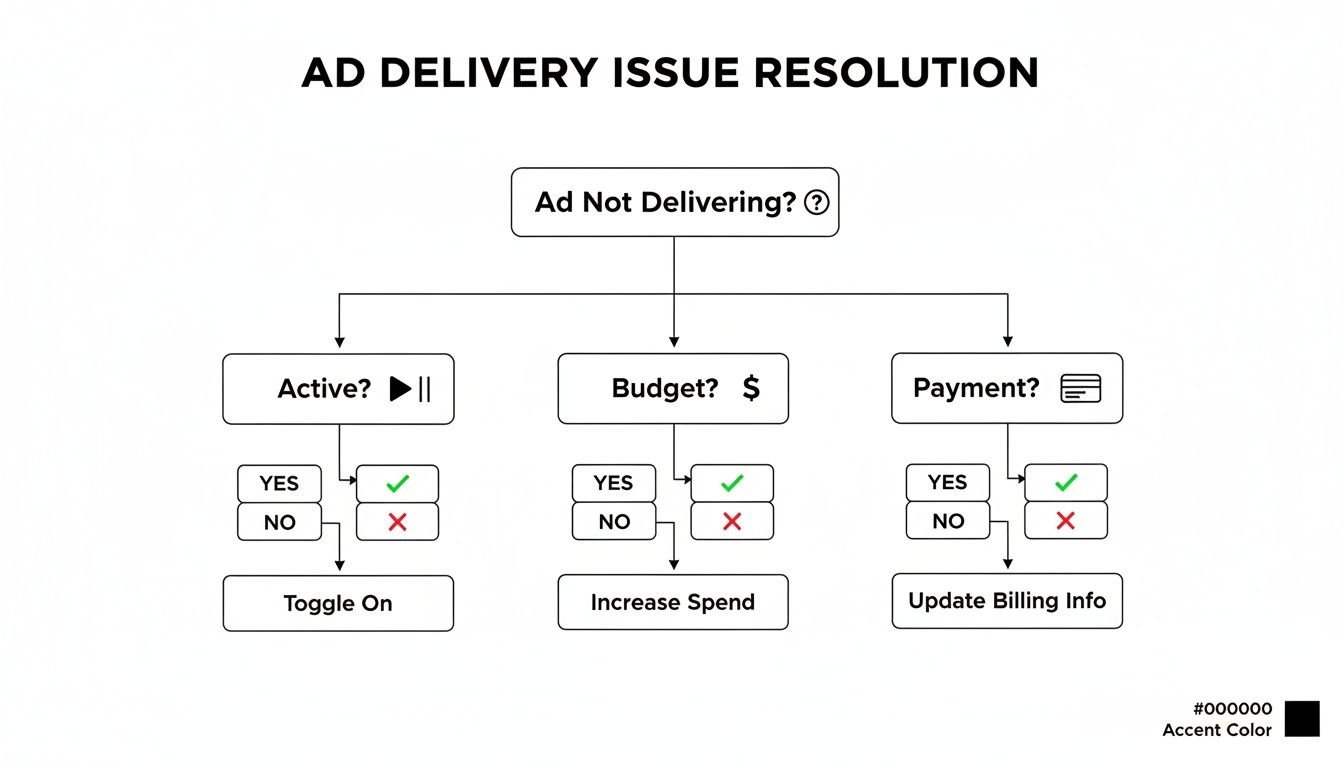
This visual guide just reinforces the process: follow a logical, step-by-step approach, always starting with the easiest potential fixes.
To make this process even faster, I've put together a quick-reference table. Use it to systematically rule out these simple oversights. Working through these checks will solve the vast majority of sudden delivery stops, saving you a ton of stress and preventing you from diving into more time-consuming investigations.
| Potential Issue | Where to Check in Ads Manager | How to Fix It |
|---|---|---|
| Campaign/Ad Set/Ad is Off | "Delivery" column at all three levels | Find the blue toggle switch and make sure it’s turned on for the campaign, ad set, and the specific ad you're troubleshooting. |
| Account Spending Limit Reached | "Billing" > "Payment Settings" | Click the "..." and then "Change" next to the Account Spending Limit. You can increase it, reset it for the month, or remove it entirely. |
| Payment Method Failed | "Billing" > "Payment Settings" | Update your primary payment method with a new card, or just hit "Pay Now" to clear any outstanding balance that’s holding things up. |
This checklist covers the low-hanging fruit. By running through it, you can quickly identify and solve the most common—and thankfully, the most easily fixable—reasons your Facebook ads aren't running.
Pro Tip: Do yourself a favor and set up spending limit notifications in your Business Settings. This tiny step can prevent these abrupt campaign pauses by alerting you before you hit the account-wide cap, giving you enough time to make adjustments.
Of course, fixing a stalled ad is just one piece of the puzzle. The bigger picture involves understanding how to optimize Facebook ads for better ROI, which is key to long-term success and preventing future delivery hiccups. Once you've got the immediate problem handled, refining your overall strategy is what keeps campaigns healthy and effective.
If the simple on/off switches didn't work, it’s time to dig deeper. Often, the real reason your ads aren't delivering is a hidden policy violation or an account-level restriction that Meta hasn't explicitly flagged on your main dashboard.
These are the silent killers of ad delivery. They can bring your entire operation to a grinding halt without any obvious warning.
This is where you put on your detective hat. Your number one tool is the Account Quality dashboard. A lot of advertisers only venture here when something is clearly on fire, but you should be checking it weekly as a preventative health check. It's the only place to get the full story on restrictions affecting your ad account, Facebook Page, or even your entire Business Manager.
Sometimes, one rejected ad is all it takes to put your whole account under a microscope, throttling the delivery of every other campaign you're running, even the ones that are perfectly compliant.
Meta's ad review is almost entirely automated, which means it can be triggered by subtle nuances in your creative or copy that you’d never expect. Your ad doesn't have to be for a banned product to get slapped with a rejection; small choices can set off the algorithm.
Here are a few real-world examples I've seen trip up even experienced advertisers:
To sidestep delivery problems from the get-go, make sure your assets are technically sound. Brushing up on the official Facebook video ad size requirements is a good place to start so your creatives are never the issue.
So you found a rejected ad in your Account Quality dashboard. Your gut reaction might be to smash that "Request Review" button.
Don't.
If you appeal a rejection without making any changes and Meta's team upholds the decision, it's another strike against your account's quality score. That can cause bigger problems down the road.
Instead, take a more strategic approach:
A huge mistake I see people make is duplicating a rejected ad and trying to run it again without any changes, hoping a different automated reviewer will approve it. This is a fast-track to getting your entire ad account restricted. The system logs everything, and repeat offenses are a massive red flag.
Policy violations are a big one, but the other major account-level showstopper is billing. A failed payment doesn't just pause your ads; it can freeze your entire ad account, stopping you from launching anything new until the debt is cleared.
This happens all the time, especially if you're using a credit card that's about to expire or has aggressive fraud protection that flags large ad spend.
The fix is usually straightforward. Head over to your Billing & Payments section and check for an outstanding balance. Resolving it is often as simple as hitting "Pay Now" or updating your payment info.
A smart move is to set up a backup payment method before you have a problem. That way, if your primary card fails for any reason, Meta can automatically charge the backup, and your campaigns will keep running without a hitch.
Are you strangling your own campaign? It’s a shockingly common mistake. An audience that's too narrow or poorly defined is one of the top reasons a perfectly good ad fails to launch, leaving you staring at a dashboard with zero impressions and zero spend.
Think of the Meta algorithm as a skilled archer. If you give it a massive target (a broad audience), it has plenty of space to find the bullseye (your ideal customer). But if you hand it a target the size of a pinhead (an overly restrictive audience), it’s going to struggle just to hit the board. This is often the real story behind a Facebook ad not delivering.

Building a good audience is about connecting the dots for the algorithm, not creating an impossible puzzle for it to solve.
One of the most frequent delivery roadblocks I see is an audience that’s simply too small. We've been conditioned to think hyper-targeting is the key to efficiency, but advertisers often fall into the trap of layering dozens of niche interests. In reality, you're just giving the algorithm no room to breathe.
Here are the usual suspects that shrink your audience to an unsustainable size:
Meta's system is built to find pockets of performance within a larger pool. When you shrink that pool to nothing, you cripple its ability to optimize and deliver your ads effectively.
Another stealthy delivery killer is auction overlap. This is what happens when you have multiple ad sets all competing for the same users. You're not just bidding against your competitors anymore; you're bidding against yourself.
Imagine you have three different ad sets running:
It’s almost guaranteed that a significant number of people exist in all three of those audiences. When this happens, Meta’s algorithm has to pick which of your own ad sets gets to enter the auction. The others get sidelined, leading to spotty or zero delivery.
Pro Tip: Use exclusions religiously. When setting up a prospecting campaign, always exclude your recent website visitors and purchasers. This one simple step creates clean, distinct audiences and stops your ad sets from cannibalizing each other's reach.
If you suspect your audience is the problem, the solution is almost always to give the algorithm more breathing room. It’s about trusting the system to find the right people within a well-defined but sufficiently large pool.
Here’s exactly what to do:
Ultimately, fixing audience-related delivery issues comes down to a mindset shift. Stop trying to manually pinpoint every single user. Instead, focus on giving the algorithm a clear goal and a large, high-quality audience to work with.
You can have the most brilliant creative and a perfectly dialed-in audience, but if your bid and budget strategy is out of whack with the reality of the Meta auction, your campaign will never get off the ground. When a facebook ad is not delivering, the problem is almost always tied to the money. The auction is a brutally competitive space; you don’t just show up, you have to bid to win.
I see so many advertisers shoot themselves in the foot by being too timid with their spending. Setting a manual bid cap way too low is the classic way to get zero delivery. You're basically telling Meta, "I refuse to pay more than this," and if the going rate to reach your audience is higher, the algorithm simply shrugs and gives the impression to someone else.
Another common mistake is spreading a tiny budget across too many ad sets. A $20 daily budget split between four different ad sets gives each one a measly $5 to work with. That’s nowhere near enough fuel to get meaningful data or escape the dreaded learning phase, leaving all of them stuck sputtering at the starting line.
Your bid strategy is how you tell Meta to spend your money. Pick the wrong one for your goal, and it's like trying to hammer a nail with a screwdriver—it just won't work. The two main options offer a classic trade-off: control versus volume.
Let's quickly run through them:
I almost always launch new campaigns with the Highest Volume strategy. It gives the algorithm the flexibility it needs to explore the auction and find pockets of efficient conversions. Only after I've established a solid baseline CPA do I even think about switching to a Cost Per Result Goal to lock in profitability as I scale.
An undersized budget is one of the top reasons an ad set dies before it ever has a chance to live. To exit the learning phase, Meta's algorithm needs about 50 optimization events (like purchases or leads) per week. If your budget is too low to hit that magic number, your campaign gets slapped with the "Learning Limited" status, and your delivery will be throttled.
Let's say you're optimizing for purchases and your average cost per purchase is $40. To get 50 purchases, you need a weekly budget of $2,000, which breaks down to about $285 per day. Trying to achieve that with a $30 daily budget is a fantasy. The algorithm won't get enough data to learn, and your delivery will grind to a halt.
A Quick Budget Reality Check
| Your Goal | Required Daily Spend Example | Why It Matters |
|---|---|---|
| Get out of "Learning Limited" | If CPA is $50, you need ~$350/week or $50/day. | This is the absolute minimum spend Meta's algorithm needs to learn and optimize your ad set effectively. |
| Compete in a tough market | For a competitive e-commerce niche, $100+/day is often table stakes. | Lower budgets just get outbid instantly, leading to zero impressions. |
| Test multiple ad sets | To test 3 ad sets, budget $50/day for each, not in total. | Underfunding tests gives you junk data and stalls every single ad set. |
If you're working with a tight budget, the answer isn't to spread it thin. It’s far better to properly fund one ad set than to have four underfunded ones that go absolutely nowhere. For more advanced tactics on stretching every dollar, our guide on optimising Facebook ads goes much deeper. By consolidating your spend, you give the algorithm a real chance to find your customers and get your campaign delivering like it should.
Sometimes, your campaign setup is technically flawless, but your ads still grind to a halt. You've triple-checked the audience, the budget is fine, and there are no account issues. So, what gives?
More often than not, the problem is hiding in plain sight: your creative. Even a top-performing ad has a shelf life. When users see it too many times, they just start to tune it out.
This is ad fatigue, and it’s a quiet but deadly campaign killer. Meta’s algorithm wants to keep users happy, so when it sees people ignoring—or worse, hiding—your ad, it hits the brakes on delivery. Suddenly, that campaign that was crushing it is dead in the water. It’s a classic sign that your facebook ad not delivering problem is about the creative, not just the technicals.

Before delivery stops completely, your metrics will start sending out warning flares. The trick is knowing which ones to watch. If you ignore these early signs, you're leaving performance and money on the table.
Your most direct indicator is the Frequency metric. It tells you the average number of times a user has seen your ad. There's no single magic number, but once this starts creeping above 3-4 in a cold prospecting campaign, it’s time to pay attention. For retargeting, a higher frequency is normal, but a sudden spike can still spell trouble.
A key metric I always monitor alongside Frequency is the First-Time Impression Ratio. If this percentage drops significantly, it means you're no longer reaching new people and are just repeatedly hitting the same saturated audience. This is a clear signal that it's time for a creative refresh to reignite engagement.
Other warning signs to look out for include:
Fixing ad fatigue isn't just about swapping one image for another and hoping for the best. To truly revive a stalled campaign, you need a systematic approach to testing that gives you clear winners and real insights. Don't just make random changes; test with a purpose.
Instead of overhauling the entire ad at once, focus on testing one variable at a time. This is the only way to know for sure what's actually making a difference.
Start by isolating the most impactful elements:
By constantly introducing new creative variations, you keep your messaging fresh, your audience engaged, and the Meta algorithm happy. This proactive approach doesn't just fix a stalled ad—it prevents fatigue from setting in in the first place, keeping your campaigns running smoothly and profitably.
A broken data connection is the silent killer of conversion campaigns. If Meta's algorithm can't see the results your ads are driving, it simply assumes they aren't working. To protect your budget, it throttles or stops delivery altogether. This is a classic reason a facebook ad is not delivering, especially when you're optimizing for valuable actions like leads or purchases.
Think of it as a feedback loop. Your ads drive traffic, your website sends conversion data back to Meta, and Meta uses that data to find more people like your customers. If that connection is weak or broken, the algorithm is flying blind. It can't attribute sales, can't build lookalike audiences, and ultimately, can't justify spending your money.
Your first port of call should always be the Events Manager in your Meta Business Suite. This is the health monitor for your entire tracking setup. Don't just give it a passing glance; you need to dig in and look for sudden drops in event volume or any new diagnostic errors that have popped up.
From there, the Test Events tool is your best friend for real-time diagnostics. It lets you walk through your website's conversion funnel as a user and see if your Pixel and CAPI events are firing correctly at each step. Go through the whole process—from landing on a page to viewing a product and making a purchase—and watch to see if each event appears in the tool as expected.
Keep an eye out for these common setup mistakes:
fbp or fbc cookies) breaks Meta's ability to match events to users, which guts your attribution.One of the most critical metrics people ignore is the event match quality score. If that score is low, it's a huge red flag. It means Meta can't reliably link your conversion data back to the specific users who saw your ads. This cripples the algorithm's ability to learn and is a direct cause of stalled ad delivery.
A faulty tracking setup is a major roadblock. It starves Meta's algorithm of the data it needs to optimize delivery effectively. Between new privacy rules and ad blockers, you can already expect up to 20% data loss. Without a robust tracking configuration, that number gets a lot worse, fast. For more on this, check out why ads fail to convert on Hawky.ai.
Getting this data foundation right is non-negotiable. For a much deeper look, our guide on tracking ads on Facebook walks you through every step to ensure your setup is bulletproof. A healthy data connection is the fuel your campaigns need to deliver consistently and find the customers who matter most.
Even with the best checklist, you’ll run into weird, specific issues that stall your campaigns. Here are a few of the most common head-scratchers I see all the time, along with some quick fixes to get your ads moving again.
This is easily the most frustrating one. You get the notification: your ad is approved and "Active." But hours later, you're still looking at zero impressions and $0 spent. What gives?
Nine times out of ten, the problem isn't the ad creative itself—it's buried in your ad set's configuration. The usual suspects are:
The fastest way to troubleshoot this is to remove any manual bid caps first. If that doesn't work, try broadening your audience targeting a bit.
Meta's official line is that most ads are reviewed within 24 hours. In my experience, that's mostly true. But it can easily stretch to 48 hours or even longer, especially during crazy busy times like Black Friday or if your ad account is brand new and doesn't have much history.
If your ad is stuck "In Review" for more than two days, something's probably up. Whatever you do, don't edit the ad—that just resets the review clock. Go check your Account Quality page instead. A hidden account restriction is often the real reason for the delay.
Seeing that "Learning Limited" status is Meta's way of telling you that your ad set is failing to get enough conversions to be optimized properly. The algorithm needs about 50 conversion events per week to exit the learning phase and figure out who to show your ads to.
When it's "Learning Limited," your ad might still get some impressions, but delivery will be choppy and inefficient. Meta can't predict who will convert, so performance suffers, and eventually, delivery just throttles to a crawl or stops completely.
The best fix is usually one of two things: either significantly increase your budget to get more conversions faster, or simplify your goal. For instance, optimize for a higher-funnel event like "Add to Cart" instead of "Purchase" to give the algorithm more data points to work with.
A huge chunk of these delivery problems stem from simple human error during manual campaign setup. It's so easy to pick the wrong setting, forget a detail, or make a typo when you're building dozens of campaigns.
Lix.so is built to prevent this. Our platform automates the entire campaign creation process using flawless templates. You can batch upload hundreds of creatives in seconds and know that every single campaign is structured perfectly for delivery from the get-go. Stop troubleshooting manual mistakes and get your ads live faster.
Start your free 7-day trial of Lix.so and see the difference for yourself.
Create hundreds of Facebook Ads campaigns in minutes with Lix.so. Batch creative upload, reusable templates, and automatic campaign generation.
✓ Free for 14 days · ✓ No credit card required · ✓ Cancel anytime

