Published by December 25, 2025 · Reading time 26 minutes · Created by Lix.so
Posting ads on Facebook isn't just about throwing some images and text together. It starts with setting up your Meta Business Suite, picking the right campaign objective in Ads Manager, zeroing in on your audience with an Ad Set, and then, finally, crafting the ad itself.
The real key? Build a solid foundation before you spend a single dollar.
Before you even think about launching a campaign, you need to get your digital workshop in order. I've seen countless advertisers rush this part, and it almost always leads to tracking nightmares, payment failures, and a tangled mess when they try to scale. The goal here is to build a clean, secure, and efficient advertising machine from the get-go.
This all happens inside the Meta Business Suite (what we used to call Facebook Business Manager). Think of it as the central command center for everything you own on Facebook and Instagram—your pages, ad accounts, pixels, and audiences. Most importantly, it keeps your personal profile completely separate from your business activities, which is a must for security and professionalism.
Getting your assets properly configured isn't just a "nice-to-have." It’s mission-critical for a smooth launch. A well-organized Business Suite means your data is accurate, your team has the right permissions, and your ad account is far less likely to get flagged for suspicious activity.
Here’s exactly what you need to lock down:
A well-structured Business Suite is the bedrock of scalable advertising. It prevents the massive headache of untangling assets later and gives you the clarity needed to make data-driven decisions. Getting this right from the start is a direct investment in your future campaign success.
One of the first things you need to wrap your head around is Facebook's three-level campaign structure. Trying to build ads without understanding this is like trying to build a house without a blueprint—it’s going to get messy. Everything you create lives within this framework.
Organizing your efforts this way allows for systematic testing and crystal-clear reporting. For example, you can test different audiences at the Ad Set level while using the same ad creative, or A/B test different ad creatives on the same audience at the Ad level. This methodical approach is the secret to figuring out what actually works and how to scale your wins.
Alright, your accounts are prepped and ready to go. Now for the fun part: diving into Meta Ads Manager to build your first campaign and turn your strategy into reality. The choices you make in the next few steps—from objective to audience to creative—will make or break your return on investment.
Think of it like this: your campaign objective is the destination you plug into your GPS. The ad set is the route it calculates. The ad creative is the car that gets you there. If any piece is off, you’ll end up lost and out of gas.
The very first screen you'll see after hitting that green "Create" button asks for your campaign objective. This is arguably the most critical decision you'll make because you're telling Meta's algorithm exactly what result to hunt for.
Don't overcomplicate it. Just match it to your business goal.
Are you an ecommerce store trying to move products? You'll want the Sales objective, hands down. Are you an agency generating interest for a client or a service-based business needing new prospects? The Leads objective is your go-to.
Here's a pro tip: Selecting the 'Sales' objective does more than just track purchases. It tells Facebook's AI to find users who have a history of buying things. Choosing the wrong objective is like hiring a world-class sprinter to win a weightlifting competition—you're using a powerful tool for the completely wrong job.
When you're trying to learn how to post ads on Facebook, efficiency is everything. You're entering an ecosystem that generates 97.5% of Meta's massive $160.38 billion revenue, competing with over 10 million other active advertisers. Knowing which objective to use is your first competitive edge.
Choosing the Right Facebook Campaign Objective
Picking the correct objective is the foundation of a successful ad campaign. This table breaks down the most common objectives we use for our ecommerce and agency clients, explaining what each one does best.
| Objective Category | Specific Objective | Best Use Case for Ecommerce/Agencies |
|---|---|---|
| Awareness | Brand Awareness | Great for massive brands launching a new product line to a broad audience. The goal is eyeballs and recall, not immediate clicks or sales. |
| Traffic | Traffic | Use this to drive clicks to a blog post, a new collection page, or any content where the primary goal isn't a direct conversion. Good for warming up audiences. |
| Engagement | Engagement | Perfect for building social proof on a specific post. If you want more likes, comments, and shares to make an ad look popular, this is the one. |
| Leads | Leads | The best choice for service businesses, high-ticket items, or agencies collecting emails. Optimizes for users who fill out forms. |
| App Promotion | App Installs | If you have a mobile app, this objective is designed to find users most likely to download and install it from the app store. |
| Sales | Sales (Conversions) | The go-to for 90% of ecommerce stores. This tells Meta to find people who are ready to pull out their credit card and make a purchase. |
While other objectives have their place, most performance-focused advertisers live in the Sales and Leads categories. Start there.
With your objective locked in, you'll move to the Ad Set level. This is where you tell Facebook who you want to see your ads. The platform's real power is its incredibly granular targeting, letting you go way beyond simple demographics to find your perfect customer.
You'll be working with a few key layers:
If the interface feels overwhelming, our complete Facebook Ads Manager tutorial is a great resource to get you comfortable with the layout.
Also inside the Ad Set, you'll manage your budget and decide where your ads are shown. You can choose between a daily budget (e.g., $50 per day) or a lifetime budget (e.g., $1,500 over a month). If you're just starting, a daily budget is usually easier to manage and keeps the ad delivery consistent.
Next up is placements. By default, Meta will select "Advantage+ placements," which automatically shows your ads across its entire network—Facebook Feed, Instagram Stories, Messenger, etc.—wherever it thinks they'll perform best. My advice? Stick with this. While you can manually pick your placements, the algorithm is smarter than you think and will find the most cost-effective spots to get you results.
Finally, you’ve arrived at the Ad level. This is what people will actually see in their feeds. Your creative—whether it's an image, a video, or a carousel of products—needs to be a thumb-stopper. It has to grab attention immediately.
Your ad copy should be clear, concise, and persuasive. It needs to explain the value of what you're offering and push the user to take the next step.
There are three key parts to get right:
Make sure your CTA button makes sense for your objective. A "Shop Now" button should always go to a product page, not your "About Us" page. This creates a seamless journey from click to conversion, which is exactly what you want.
Alright, you've dialed in your audience and set the budget. Now for the fun part—and arguably the most important—the ad creative itself.
This is the final piece of the puzzle, the actual thing people will see in their feed. In a world of infinite scrolling, your creative is your one and only chance to make someone stop. I've seen perfectly targeted campaigns fall flat on their face because the creative was just… meh.
Your mission is simple, but tough: create something that stops the scroll. People fly through their feeds on Facebook and Instagram. You have maybe a second or two to grab their attention. The image or video is the hook, and the ad copy is what reels them in.
Let's get one thing straight: the vast majority of people will see your ad on their phone, probably while they're doing five other things. This isn't an option; it's a reality that has to drive every single creative choice you make. What looks incredible on your big desktop monitor can easily become a blurry, unreadable mess on a 6-inch screen.
Here’s what you need to burn into your brain:
Polished, high-budget studio ads can work, but some of the best-performing creative right now looks like it was made by a real person on their phone. Why? Because people are tired of slick, corporate ads. They trust content that feels authentic and user-generated.
This is where User-Generated Content (UGC) becomes your secret weapon. UGC is any content—photos, videos, reviews—that your customers create, not your brand. It’s pure social proof, showing potential buyers that real people are already using and loving your product.
We've seen firsthand that folding UGC into an ad strategy can slash Cost Per Click by up to 50%. It just builds instant trust because the recommendation comes from a peer, not the company trying to make a sale.
You can get more UGC by running contests, offering discounts, or even just reaching out to people who tag your brand in their posts. Even if you hire creators to make ads for you, the brief should be clear: make it look native to the platform. It should feel less like a TV commercial and more like a helpful post from a friend. If you're trying to figure out which ad formats work best for your goals, it's worth exploring the different types of Facebook ads available to see what fits.
Whatever you do, don't just create one ad and pray it works. The real key to long-term success is to build a library of creative assets so you can constantly test different angles and see what your audience actually responds to.
For a single product, your testing library might include:
When you have a diverse library like this, you're always ready to launch new tests, double down on what’s working, and combat ad fatigue. This turns ad creation from a guessing game into a data-driven machine.
Building campaigns inside Ads Manager by hand is perfectly fine when you're just starting out. But the second you need to test more than a handful of creatives, that manual process becomes a massive bottleneck. It just kills your momentum and wastes hours you could be spending on strategy.
Seriously, creating dozens of ads for A/B testing one by one is not a scalable plan. This section is all about getting you out of that tedious, click-by-click grind and into smarter, faster workflows that let you test and iterate at the speed your business demands.
Facebook does offer a built-in solution for this: the ability to import and export ads using a spreadsheet. This lets you create or edit multiple campaigns, ad sets, and ads all at once, which is definitely a step up from doing everything through the interface.
The basic process looks something like this:
While it's faster than pure manual creation, this method can be incredibly clunky. Spreadsheets are notorious for formatting errors. A single mistake in one cell—a misplaced comma or an extra space—can cause the entire upload to fail, leaving you to decipher cryptic error messages.
For agencies and serious ecommerce brands, you need a much more powerful approach. This is where dedicated tools built for high-volume ad creation completely change the game. They turn the process from a manual slog into an efficient, almost automated workflow.
Let's be real, posting ads on Facebook is a massive industry. Meta is projected to rake in a staggering $156.8 billion in global ad revenue. When you're trying to get a piece of that, manually setting up campaigns with 10-100 creatives can take hours per batch and is ripe for errors that burn through your budget.
This is why tools like Lix.so are such a lifesaver. They can slash that build time from hours down to seconds by using batch ingestion, reusable templates, and a clean integration with your Facebook Business account.
This flowchart breaks down the core creative formats that benefit the most from a scaled creation process.
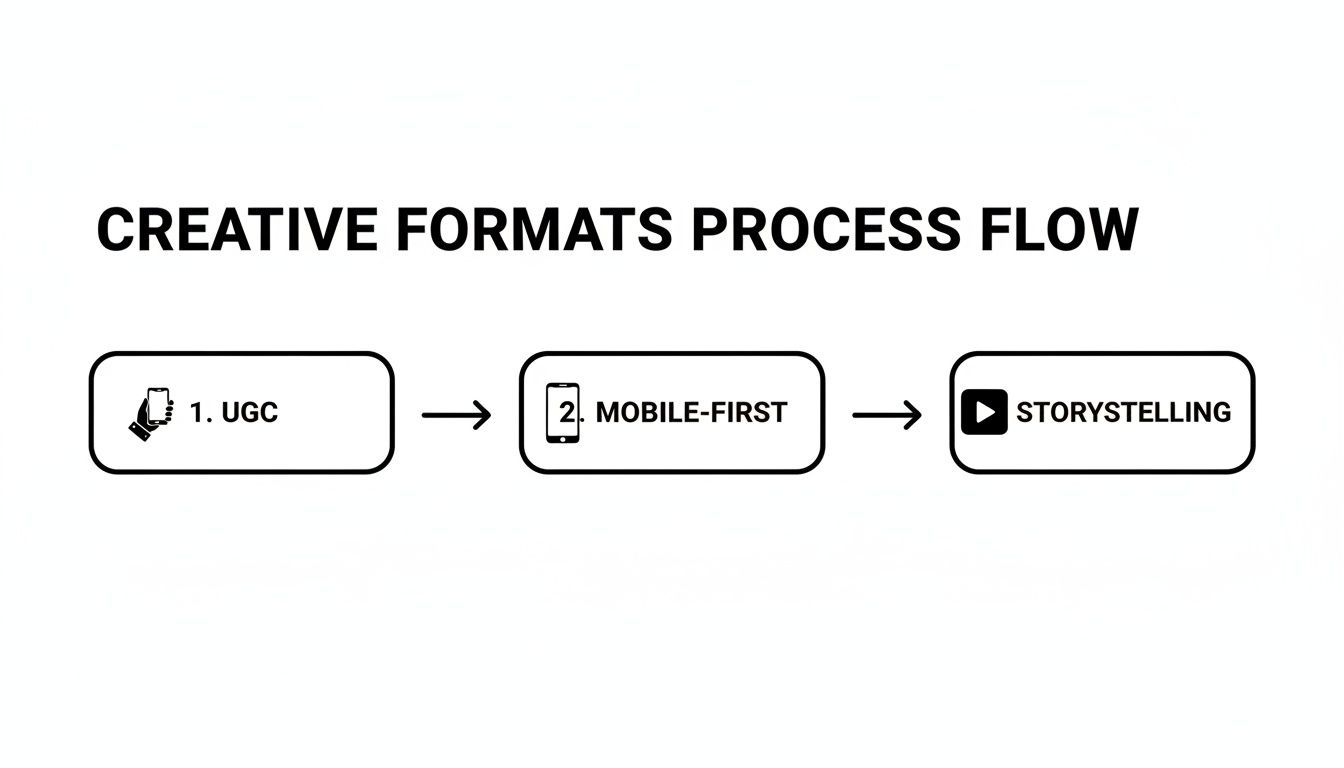
The key insight here is that whether you're working with authentic UGC, snappy mobile-first videos, or polished storytelling ads, a batch creation system lets you test them all at the same time without the manual overhead.
Tools designed specifically for this give you a massive leg up by streamlining every single step. For instance, Lix.so lets you batch upload 10 to 100+ creatives in seconds, pulling them directly from a Google Drive folder. No more uploading each file one by one.
The real magic, though, is in reusable campaign templates. Instead of rebuilding your campaign and ad set structures from scratch every single time, you create a template once. This template holds all your go-to settings:
Once that template is saved, launching a new test is as simple as grabbing the template and dropping in your new batch of creatives. The software automatically builds out all the ads, assigns them to the right ad sets, and publishes everything to Meta without any import errors. You can dig deeper into how the API for Facebook Ads makes this level of automation possible.
This templated approach is the secret to high-velocity creative testing. It cuts the time it takes to launch complex, multi-ad campaigns from hours down to just a few minutes. This frees up your team to focus on strategy and analysis instead of getting bogged down in repetitive manual tasks.
For agencies juggling multiple clients or brands testing dozens of creative angles, this workflow isn't just a nice-to-have—it's a necessity. It’s how you consistently find winning ads, scale your budget with confidence, and stay miles ahead of competitors who are still stuck building everything by hand.
Launching your Facebook ads is just the starting line. Honestly, it's the easy part. The real work—the part that separates money-burning experiments from actual profit engines—begins the moment you hit "Publish."
Success from here on out is all about diving into the data, figuring out what it's trying to tell you, and making smart adjustments. This is where most people get completely overwhelmed. Ads Manager throws a sea of columns and metrics at you, but only a handful of them actually matter for growing your business. Your job is to cut through the noise.
First things first, forget about vanity metrics like "Reach" or "Impressions" for now. While they have a place, they don't tell you if your ads are actually putting money in your pocket. Your entire focus needs to be on efficiency and profitability.
For any performance-focused advertiser, it really boils down to two key numbers: Cost Per Result and Return on Ad Spend (ROAS).
These two metrics are your north stars. Every single optimization decision you make should be aimed at either lowering your Cost Per Result or jacking up your ROAS.
Never, ever make budget decisions based on feelings or surface-level metrics like clicks. The data is your only source of truth. A campaign with a mediocre click-through rate but a sky-high ROAS is a clear winner; a campaign with thousands of clicks but zero sales is a complete failure.
Once you’re laser-focused on the right metrics, making decisions becomes much, much clearer. The process is a simple loop: analyze the data, form a hypothesis about what’s working (or not), and take action.
You'll essentially be sorting your campaigns, ad sets, and individual ads by performance and making a call: scale it up or shut it down.
With Facebook's ad ecosystem now reaching 2.11 billion people and over 10 million advertisers competing for attention, you need an edge. Knowing how to read your data and optimize spending is that edge. You can find more Facebook user and advertiser stats on Hootsuite's blog.
To help you make sense of the data, here’s a quick-reference table for the most important metrics you'll be looking at in your Ads Manager dashboard.
| Metric | What It Measures | Action to Take When It's Low/High |
|---|---|---|
| ROAS (Return On Ad Spend) | Total revenue generated per dollar spent on advertising. The ultimate profitability metric. | High: Scale the budget. Low: Investigate other metrics or cut the ad/ad set. |
| Cost Per Result | The average cost for each desired action (e.g., Purchase, Lead). | High: A sign of inefficiency. Cut the ad or troubleshoot creative/targeting. Low: Excellent! Consider scaling. |
| CTR (Click-Through Rate) | The percentage of people who saw your ad and clicked on it. Measures ad engagement. | High: Your creative is resonating. Low: Your creative/copy isn't grabbing attention. Test new visuals or hooks. |
| CPC (Cost Per Click) | The average cost for a single click on your ad. | High: Can indicate low relevance or high competition. A low CTR often leads to a high CPC. Low: Good, your ad is efficiently driving traffic. |
| Frequency | The average number of times each person has seen your ad. | High (e.g., >3-4): Your audience might be getting tired of the ad. Watch for ad fatigue. Low: Your ad is still fresh to the audience. |
| CPM (Cost Per 1,000 Impressions) | The cost to show your ad to 1,000 people. Measures the cost of reaching your audience. | High: Your audience is expensive or competitive. Low: You're reaching people at a low cost. |
This table isn't exhaustive, but it covers the core drivers of performance. Use it to diagnose problems and guide your next move.
Even perfectly structured campaigns hit roadblocks. The two most common headaches you’ll run into are rising costs and the dreaded ad fatigue.
Ad Fatigue is what happens when your audience has seen your ad so many times they just start scrolling right past it. The tell-tale sign is a rising Frequency metric combined with a dropping Click-Through Rate (CTR). The fix is simple: swap in fresh creative. This is exactly why building a library of ad assets before you launch is a game-changer.
Rising Costs can sneak up on you for lots of reasons, like new competitors bidding on your audience or you've just saturated your current targeting. If you see your Cost Per Result slowly creeping up, try launching a new ad set targeting a completely different audience. This can introduce your product to a fresh pool of potential customers and bring your costs back in line.
Even the most seasoned media buyers run into the same few annoying problems. You're not alone. Let’s walk through the most common questions that pop up when you're in the trenches, running Facebook ads.
It's the notification nobody wants to see, but it happens to everyone. You hit "Publish," feel that sense of accomplishment, and then... rejected.
Almost every single time, it’s because you’ve accidentally tripped one of Meta’s Advertising Policies. They have a rule for everything, from making slightly exaggerated claims in your copy to using a brand’s logo you don't have permission for.
Your first move should always be to read the specific rejection reason Facebook gives you. Don't guess. They'll usually point you to the exact policy you've broken. From there, the fix is typically straightforward:
Once you’ve made the changes, just resubmit the ad. If you're certain it was a mistake by their automated system (which definitely happens), you can request a manual review.
There's no single magic number here. The best way to think about it is to start with a budget you're comfortable losing, because you're not buying sales yet—you're buying data.
A great starting point for many advertisers is a daily budget of $10 to $20 per ad set. Let it run for at least 3 to 5 days without touching it.
The goal of this initial phase isn't to strike gold. It's to give the algorithm enough fuel to find the right people and exit the dreaded "learning phase." You're trying to establish a baseline Cost Per Result. Once you have an ad set that’s consistently getting results at a price you like, that’s when you start to think about scaling.
Pro Tip: When you're ready to scale a winning ad set, increase its budget by no more than 20% every few days. Big, sudden jumps in spend can throw the algorithm off and tank your performance. Slow and steady is the name of the game.
Getting your head around Facebook's three-level structure is non-negotiable. It’s the foundation for your entire strategy, dictating everything from your main goal down to the exact image someone sees on their phone.
Here’s how it breaks down in simple terms:
This structure is built for methodical testing. You can have one Sales campaign with multiple ad sets testing different audiences (e.g., one for "yoga lovers," another for "Lululemon customers"). Then, within each of those ad sets, you can have multiple ads testing different videos or headlines. This organized approach is how you find out what really moves the needle.
Ready to stop wasting hours building campaigns manually? Lix.so lets you launch dozens of ads in seconds with batch uploads and reusable templates. Cut your build time, eliminate errors, and focus on the strategy that drives results. Start your free 7-day trial of Lix.so today.
Create hundreds of Facebook Ads campaigns in minutes with Lix.so. Batch creative upload, reusable templates, and automatic campaign generation.
✓ Free for 14 days · ✓ No credit card required · ✓ Cancel anytime

